

Managing tasks with Org mode and iCalendar
In an earlier article, I reviewed the todo.txt and Taskwarrior task managers. This article continues the process of examining task managers by looking at tools for Org mode, which is a system originally created for Emacs, as well as at tools that make use of the iCalendar standard. It is time to find out whether I can find a system that meets my needs.
Not just for Emacs
Org mode is an Emacs mode
for note-taking and project planning, though Org's workflow and file format
have found adoption outside of Emacs, as we'll see. Org mode makes it easy to keep notes,
maintain to-do lists, plan projects, and more in Emacs. Worg, a community site for Org,
describes it as a "powerful system for organizing your complex life
with simple plain-text files
". This sounds rather appealing since
many readers probably appreciate the power of simple text files and might
agree that modern life is getting increasingly complex.
What makes Org mode interesting is that it's not merely a task manager, but a system to organize your life. Org mode can also be used to keep a variety of notes, such as ideas, quotes, a list of links, or code snippets. What I noticed is that I often jot down thoughts and ideas throughout the day as I perform a range of activities, such as working on a problem, reading articles, or interacting with others. Some of those notes might just be random observations that I want to preserve, while others may lead to specific tasks later. Keeping both notes and tasks in the same document seems natural from this perspective.
Org mode offers a rich set of features, such as folding sections (i.e. hiding information under a particular heading), keeping a time record for tasks (clocking in and out), capturing notes or tasks from within Emacs or other applications (such as a web browser or PDF viewer), maintaining tables (including support for text spreadsheets), and exporting to other formats (such as HTML, LaTeX, or Open Document Format). In terms of tasks, Org mode sports features commonly found in task managers, such as states (e.g. TODO and DONE), task dependencies (expressed via sub-tasks), priorities (e.g. [#A] for the highest priority), and tags (e.g. :@home:).
These features can be used like this:
    * LWN
    ** DONE Write article about task managers, part 1
    ** TODO [#A] Write article about task managers, part 2 :@home:
    *** TODO [#A] Review Org mode
    SCHEDULED: <2020-07-09 Thu 12:00> DEADLINE: <2020-07-09 Thu 17:00>
A star denotes a headline and can be used for sub-sections (and sub-tasks for tasks). Since Org mixes tasks and notes, a note essentially becomes a task if it has a state (like TODO). Each section can have a planning line with keywords like SCHEDULED, DEADLINE, and CLOSED. A more detailed example, serving as a tutorial of the Org syntax, is available.
Org mode also has built-in support for agendas with scheduled tasks and deadlines. There are a number of tutorials showing how to implement task-management systems in Org mode, such as for the popular Getting Things Done (GTD) system.
Even though Org started as a mode for Emacs, the Org file format has been implemented by many other applications. Worg has a list of other tools, although that page seems somewhat out of date. Pandoc can convert Org files to other markup formats, Orga offers an Org parser in JavaScript, GitHub and GitLab render Org files automatically, and so on.
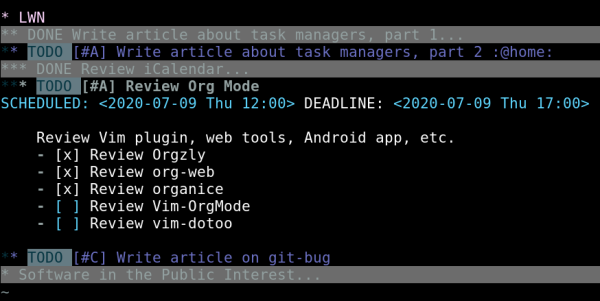
My editor of choice, Vim, offers a plugin based on the Org format called Vim-OrgMode (seen above). It supports basic functionality from Emacs's Org mode, such as folding, changing the state of tasks, and displaying an agenda. However, the functionality is more limited compared to Emacs (e.g. there's no support for tables). Another Vim plugin, Vim Do Too, also looks promising, but it is more "inspired by Org mode" than a fully compatible replacement.
For those who want to add tasks on the web or from a mobile device, org-web is one option. The web app runs in the browser instead of on a server, has support for Dropbox and Google Drive, and offers a lot of features, including an agenda view and tables. One potential shortcoming is that org-web is specifically optimized for mobile use. This is addressed by organice, a friendly fork of org-web, which is built for mobile and desktop browsers. Organice offers extensive documentation, and its comparison page highlights a number of advantages, such as support for WebDAV (which can be used to sync with Nextcloud).
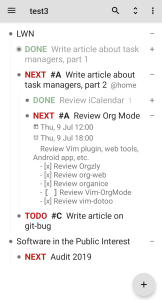
Finally, Orgzly (seen at right) is a popular app for Android. Despite Orgzly having one core developer, development is pretty active. Orgzly supports saving Org files on Dropbox, using WebDAV, or to local storage. It offers many features one would expect from a task manager for a mobile device, such as reminders of scheduled events and deadlines. While adding geolocation information to tasks is supported, Orgzly doesn't yet have reminders based on the location. It does have a number of built-in filters (agenda, next three days, scheduled), and custom filters ("searches" in Orgzly) can be defined.
Overall, the Org ecosystem looks quite attractive. The file format is simple, yet powerful. While Org mode for Emacs is the most mature, there are a number of interesting solutions that expand the scope of Org beyond just Emacs.
Standards, standards, ... and iCalendar
After reviewing three different ways of storing tasks, one starts to wonder why there isn't a single standard to describe tasks. Of course, cynics will point to the xkcd comic about standards. As it turns out, though, there is an actual standard in the form of iCalendar, also known as RFC 5545. Many readers may be familiar with the ICS files sent out by email from applications such as Microsoft Outlook and Google Calendar, which contain event information in the form of VEVENT entries. But the standard also defines tasks, called VTODO entries, with the usual features needed to support them (priorities, progress, scheduled and due dates, dependencies, etc.).
iCalendar is also a text-based format, although it's more complicated than todo.txt or Org, and is not usually edited manually. One attraction of iCalendar over the alternatives is that it has been designed with synchronization in mind; CalDAV can be used to synchronize calendars (including tasks). Calendars can be stored on Nextcloud (self-hosted or via one of the many providers) or on a self-hosted server using Radicale or Xandikos. Vdirsyncer is a command-line tool to synchronize calendars and contacts; DAVx5 does the same on Android.
There are many applications built around iCalendar. On Android, I first found OpenTasks. The app looks quite attractive and offers basic task management, but many important features are missing, including recurring tasks and sub-tasks. The GitHub issue for sub-tasks suggests that they would be implemented after recurrence, but that comment was made in 2017 and recurring tasks are still not implemented.
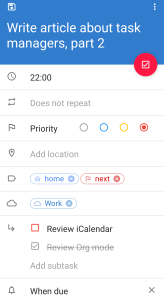
A more actively maintained Android app, although also having only one core developer, is Tasks, which is seen at the right. It is available on F-Droid and as Tasks.org on Google Play. Tasks originates from Astrid, which was a popular application many years ago, but its development stopped after the company behind it was acquired by Yahoo. (The Grumpy Editor reviewed Astrid back in 2011). Tasks feels quite polished and it has some nice gimmicks, such as the ability to assign not just a color to a tag but also an icon. You can hide tasks until a later date, define custom filters, and receive reminders based on your location. Tasks implements the core functionality of a task manager, although there are, of course, many open feature requests, such as for swipe gestures, progress bars, and Markdown rendering.
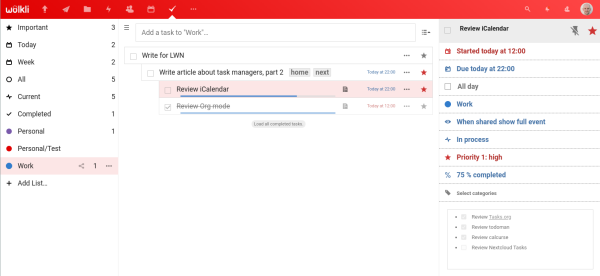
Since iCalendar is a standard, it's easy to use multiple applications to manage tasks. While I find Tasks useful on my phone to get reminders and to add tasks on the go, I prefer something on my desktop for more in-depth management. For this purpose, Nextcloud Tasks (seen below) looks quite appealing. It supports the core functionality of task management, such as sub-tasks, priorities, scheduled and due dates, and progress. Unfortunately, development is quite slow, although the developer (who works on Nextcloud Tasks in his spare time) actively comments on tickets and invites people to submit pull requests. Furthermore, the application would be vastly more useful with better integration with Nextcloud, such as implementing Nextcloud's concept of projects and integrating with other Nextcloud apps, such as Deck, a Kanban style organization tool.
There are also some iCalendar solutions for the command line, although the offerings are not as mature as what's available for Taskwarrior. Todoman can be used to list, edit, and create tasks from the command line. There is also calcurse, a curses-based calendar which can display tasks.
In summary, iCalendar is a standard for events and tasks, which is implemented in a large number of tools. In addition to those introduced here, KDE's Korganizer, GNOME To Do, and others use the iCalendar format. One downside is that the format, while text-based, is more complex and hard to edit manually.
Summary
After reviewing four different systems to manage tasks, it's time to draw conclusions. First of all, I observed a trend all too common with open-source projects. While one attraction of open source is the sheer diversity of what's available, it's also a curse: many of the reviewed task-management systems had several half-baked solutions instead of one solution for each category (command-line, web, and mobile). If more developers joined forces to focus one on solution, we might have more mature and longer lasting projects.
Having said that, I feel that all of the four systems have some appeal and offer robust solutions. Personally, todo.txt seems too simple to me. While the format is definitely quite attractive to some users, I find Org's format to be more expressive, yet simple enough to edit by hand. The simple addition of headers in Org, compared to todo.txt, by itself makes a huge difference, since you can structure your file much better. A better todo.txt editor could potentially structure the file to provide similar functionality, however, perhaps by creating virtual sections based on tags.
When I started my review, I was fairly sure I was looking for a combination of one mobile and one desktop (native or web) application to manage tasks. While I'm traditionally a command-line person, it seems that task management would benefit from a modern, visual design that allows you to easily sort through tasks, separating important tasks from the rest. Yet, I was surprised by Taskwarrior's highly capable text-based tools that made the management of tasks easy. I also found Org appealing since I spend a lot of time editing texts; managing tasks in my editor feels right. Unfortunately, the Org plugins for Vim are not nearly as featureful as Org mode for Emacs.
The most future-proof choice seems to be iCalendar since it's an actual standard; its level of adoption will likely increase over time. Unfortunately, the format isn't easy enough for routine manual editing and I'd rather store an Org file in Git than an iCalendar file. While both are plain-text files, a diff on the Org file will be easier to read.
In an ideal world, I would have Taskwarrior with an iCalendar backend, so I could combine the robust text-based tools from Taskwarrior with the attractive web and mobile solutions for iCalendar. And even though I've mostly been leaning toward an iCalendar-based solution so far, I can't stop thinking about Org's powerful, yet simple system, which feels very natural.
While I haven't fully made up my mind, one conclusion is clear, though.
Apart from todo.txt, which wouldn't work for me personally, I find
all of the systems to be useful and interesting in their own ways. I could make any of
the three systems work. The only question is which one best fits into my
workflow and the only way to find out is to enter my tasks and see how I get
along. In the worst case, I'll add a task to revisit this topic in another
year.
| Index entries for this article | |
|---|---|
| GuestArticles | Michlmayr, Martin |