

Distributions
Ubuntu Touch, three years later
Back in early 2013, your editor dedicated a sacrificial handset to the testing of the then-new Ubuntu Touch distribution. At that time, things were so unbaked that the distribution came with mocked-up data for unready apps; it even came with a set of fake tweets. Nearly three years later, it seemed time to give Ubuntu Touch another try on another sacrificial device. This distribution has certainly made some progress in those years, but, sadly, it still seems far from being a competitive offering in this space.In particular, your editor tested version 16.04r3 from the testing channel on a Nexus 4 handset. The Nexus 4 is certainly past its prime at the end of 2015, but it still functions as a credible Android device. It is, in any case, the only phone handset on the list of supported devices other than the three that were sold (in locations far from your editor's home) with Ubuntu Touch pre-installed. It is a bit discouraging that Ubuntu Touch is not supported on a more recent device; the Nexus 4 was discontinued over two years ago.
People who are accustomed to putting strange systems on Nexus devices know the drill fairly well: unlock the bootloader, install a new recovery image if necessary, then use the fastboot tool to flash a new image. Ubuntu Touch does not work that way; instead, one must use a set of tools available only on the Ubuntu desktop distribution. Your editor's current menagerie of systems does not include any of those, but, fortunately, running the Ubuntu 15.10 distribution off a USB drive works just fine. It must be said, though, that Ubuntu appears not to have gotten the memo regarding high-DPI laptop displays; 15.10 is an exercise in eyestrain on such a device.
Once the requisite packages have been installed, the ubuntu-device-flash command can be used to install Ubuntu Touch on the phone. It finds the installation image wherever Canonical hides them (it's not obvious where that is) and puts it onto the phone; the process, on the Nexus 4, took about three hours — a surprisingly long time. Among other things, it installs a Ubuntu-specific recovery image, regardless of whether that should be necessary or not. The installation takes up about 4.5GB of space on the device. At the end, the phone reboots and comes up with the Ubuntu Touch lock screen, which has changed little in the last three years. The first boot takes a discouragingly long time, but subsequent reboots are faster, perhaps faster than Android on the same device.
Alas, that's about the only thing that is faster than Android. The phone starts sluggish and gets worse as time goes on. At one point it took a solid minute to get the dialer screen up on the running device. Scrolling can be jerky and unpleasant to work with. At least once, the phone bogged down to the point that there was little alternative to shutting it down and starting over.
Logging into the device over the USB connection offers some clues as to why that might be. There were no less than 258 processes running on the system. A number of them have "evolution" in their name, which is never a good sign even on a heftier system. Daemons like NetworkManager and pulseaudio are running. In general, Ubuntu Touch seems to have a large number of relatively large moving parts, leading, seemingly, to memory pressure and a certain amount of thrashing.
Three years ago, Ubuntu Touch was built on an Android chassis. There are still bits of Android that show up here and there (it uses binder, for example), but a number of those components have been replaced. This release runs an Android-derived kernel that identifies itself as "3.4.0-7 #39-Ubuntu". 3.4.0 was released in May 2012, so it is getting a bit long in the tooth; the 3.4.0 number suggests this kernel hasn't even gotten the stable updates that followed that release. Finding the source for the kernel in this distribution is not easy; it must almost certainly be hidden somewhere in this Gerrit repository, but your editor ran out of time while trying to find it. The SurfaceFlinger display manager has been replaced by Ubuntu's own Mir, with Unity providing the interface. Upstart is the init system, despite the fact that Ubuntu has moved to systemd on desktop systems.
When one moves beyond the command-line interface and starts playing with
the touchscreen, one finds that the basics of the interface resemble what
was demonstrated three years ago. Swiping from the left edge brings the
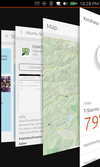 Unity icon bar (but no longer switches to a home screen; the "home screen"
concept doesn't really seem to exist anymore). Swiping from the right
will either switch to another application or produce an overview of running
applications; it's not clear how it decides which. The overview provides a
cute oblique view of the running applications; it's sufficient to choose
one, but seems somewhat wasteful of screen space. Swiping up from the
bottom produces an application-specific menu — usually.
The swipe gestures work well enough once one gets used to them, but there
is scope for confusion. The camera app, for example, will instruct the
user to "swipe left for photo roll," but, unless one is careful to avoid
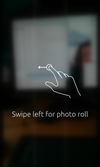 the right edge of the screen, that gesture will yield the overview screen
instead. One can learn subtleties like "swipes involving the edge" and
"swipes avoiding the edge," but one could argue that such an interface is
more difficult than it needs to be and less discoverable than it could be.
Speaking of the camera app, it takes pictures as one might expect, and it has gained a high-dynamic-range mode in recent years. It still has no support for stitching together photos in a panorama or "photo sphere" mode, though.
The base distribution comes with a fairly basic set of apps. Many of them
appear to be interfaces to an associated web page; the Amazon, GMail, and
Facebook apps, for example. Something called "Shorts" appears to be an RSS
reader, though it seems impervious to the addition of arbitrary feeds.
There is a terminal app, but it prompts for a password — a bit surprising
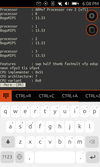 given that no password had ever been supplied for the device (it turns
out that one should use the screen-lock PIN here). It's not clear that
this extra level of "security" is helpful, given that the user involved is
already able to install, launch, and run applications on the device, but so
it goes.
Despite the presence of all those evolution processes, there is no IMAP-capable email app; there are also no mapping apps. There is a rudimentary web browser with Ubuntu branding; it appears that this browser is based on Chromium. The weather app is limited to a few dozen hardwired locations worldwide; the closest supported location to LWN headquarters was Houston, which, one assumes, is unlikely to be dealing with the foot of snow your editor had to shovel while partway through this article. One suspects we would have heard about that.
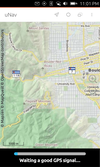
Inevitably, there is a store from which one can obtain other apps. There
are, for example, a couple of seemingly capable, OpenStreetMap-based
mapping apps there,
including one that claims turn-by-turn navigation, but nothing requiring
GPS access worked in your editor's tests. Games abound, of course, but
 there is little in the way of apps that are well known in the Android or
iOS worlds. The store will refuse to allow the installation of apps until
one creates a "Ubuntu One" account; that is unfortunate, but most Android
users never get anywhere near that far before having to create or supply a
Google account.
Canonical puts a fair amount of energy into promoting its "scopes," which are said to be better than apps for the aggregation of content. In truth, they seem to just be another type of app with a focus on gathering information from more than one source. Although, with "branded scopes," the "more than one source" part is often deliberately put by the wayside. Your editor played around with scopes for a while, but, in truth, could not find what was supposed to make them special.
Permissions management in Ubuntu Touch resembles that found in recent
Android releases: the user will be prompted the first time an application
tries to exercise a specific privilege. As with Android, the number of
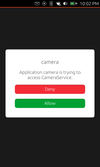 actions requiring privilege is relatively small, and "connect to any
arbitrary site on the Internet" is not among them. Access to location
information or the camera, though, will generate a prompt. There is also,
again as with Android, a way to control which applications are allowed to
place notifications on the screen.
Ubuntu Touch still seems to drain the battery far more quickly than Android does on the same device. Indeed, it is barely able to get through the night while sitting idle. There is a cute battery app that offers a couple of "ways to reduce battery use," but it lacks Android's ability to say which apps are actually draining the battery (though, it must be said, that information from Android is often less helpful than one might hope).
The keyboard now has proper multi-lingual support (though there is no
visual indication of which language is currently in effect) and, as with
Android, one
can switch between languages on the fly. It offers word suggestions, does
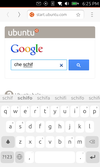 spelling correction, and all the usual things. One missing feature,
though, is "swipe" typing which, your editor has found, can speed the
process of inputting text on a small keyboard considerably. There is also
no voice input; no major loss from your editor's point of view, but others
will probably see that differently.
There is a lot to like in Ubuntu Touch. There is some appeal to running something that looks like a proper Linux system, even if it still has a number of Ubuntu-specific components. One does not get the sense that the device is watching quite as closely as Android devices do, though it's not entirely clear, for example, what happens with location data or where it might be stored. In any case, a Ubuntu device clearly has more free software on it than most alternatives do; there is no proprietary "play services" layer maintaining control over the system.
Sadly, though, this distribution still is not up to the capabilities and the performance of the big alternatives. Switching to Ubuntu Touch means settling for a much slower system, running on a severely limited set of devices, with a relative scarcity of apps to choose from. Your editor would very much like to see a handset distribution that is more free and more open than the alternatives, but that distribution must also be competitive with those alternatives, and that does not seem to be the case here. Unless Canonical can find a way to close the performance and feature gaps with Android, it seems unlikely to have much hope of achieving uptake that is within a few orders of magnitude of Android's.
Brief items
Distribution quote of the week
I'm one of those. But it doesn't mean none of my free time is used to do the same thing. By passion ? Perhaps, but my main motivation is to have tools that works.
Release for CentOS Linux 7 (1511)
The CentOS project has announced the release of CentOS Linux 7 (1511), derived from Red Hat Enterprise Linux 7.2. "This release supersedes all previously released content for CentOS Linux 7, and therefore we highly encourage all users to upgrade their machines. Information on different upgrade strategies and how to handle stale content is included in the Release Notes."
SUSE Linux Enterprise 12 Service Pack 1 released
The SUSE Studio blog looks at the release of SUSE Linux Enterprise 12 SP1. This service pack includes updates to OpenJDK, PostgreSQL, Python, and more. See the release notes for details.
Distribution News
Debian GNU/Linux
AppStream / DEP-11 support now available in the Debian archive
DEP-11 is a Debian extension proposal to enhance the metadata provided by the Debian archive. "AppStream is a metadata specification, describing software components and which packages they are contained in. A software component can be anything, from a desktop-application over a font to a driver or firmware. DEP-11 is a YAML-based version of the XML AppStream specification. On Debian, we generate the DEP-11 metadata (currently mainly for desktop-applications, other components will follow), and make it available in the archive, for APT to download."
Bits from the Debian Continuous Integration project
The Debian Continuous Integration project was launched almost two years ago. This is an update on the latest developments. "The effort of transforming debci in a distributed system was started by Martin Pitt, who did an huge amount of work. In the latest months I was able to complete that work, to a point where I am confident in letting it run (mostly) [unattended]. We also had lots of contributions to the web UI from Brandon Fairchild, who was a GSOC intern in 2014, and continues to contribute to this date. All this work culminated in the migration from a single-worker model to a master/workers setup, currently with 10 worker nodes. On busy periods all of those worker nodes will go on for days with full utilization, but even then the turnaround between package upload and a test run is now _a lot_ faster than it used to."
Fedora
Fedora elections
Fedora elections have concluded and the results are available. There were 7 seats open for the FAmSCo election. The winners are Christoph Wickert, Sirko Kemter, Truong Anh Tuan, Abdel G. Martínez L., Gabriele Trombini, Luis Bazan, and Giannis Konstantinidis. Robert Mayr is the winner of the single open seat on the Council. FESCo had five open seats that went to Kevin Fenzi, Adam Miller, Jared Smith, Kalev Lember, and Parag Nemade.
Newsletters and articles of interest
Distribution newsletters
- DistroWatch Weekly, Issue 640 (December 14)
- 5 things in Fedora (December 14)
- Linux Mint Monthly News (November)
- Ubuntu Kernel Team Newsletter (December 15)
- Ubuntu Weekly Newsletter, Issue 446 (December 13)
Klumpp: What’s up in Tanglu?
Matthias Klumpp has an update on Tanglu. Version 4 of the Debian-based distribution was planned for this month, but the release has been postponed until February/March 2016. "Reason for this change in schedule is the GCC 5 transition (and more importantly the huge amount of follow-up transitions) as well as some other major infrastructure tasks, which we would like to complete and give them a good amount of testing before releasing. Also, some issues with our build system, and generally less build power than in previous releases is a problem (At least the Debile build-system issues could be worked around or solved). The hard disk crash in the forum and bugtracking server also delayed the start of the Tanglu 4 development process a lot. In all of these tasks, manpower is of course the main problem 😉"
GeckoLinux: This Baby Knows What It's Doing (LinuxInsider)
LinuxInsider reviews GeckoLinux. "GeckoLinux is a newcomer. I mean very new. Its first release was last week. You shouldn't view this distro as a wailing infant, however. It's based on openSuse Leap 42.1 and was leapfrogged into near-instant maturity from Suse Studio, a Web application for building and testing software applications in a Web browser. No, it's not a Chromebook-like operating system. Rather, it's a fully functional Linux distro that taps into the Suse Linux infrastructure. It is a marked improvement over traditional Suse-based distros. That is what led its developer to create a better Linux mousetrap with GeckoLinux."
Page editor: Rebecca Sobol
Next page:
Development>>