

LWN.net Weekly Edition for February 5, 2015
A test run of openHAB 1.6
At first glance, home automation often sounds like it should be a straightforward (if not simple) task—sure, there are a lot of "smart" devices for the home these days (thermostats, light bulbs, utility meters, etc.), but most of them have extremely simple command sets. Light bulbs turn off and on, thermostats trigger heating or cooling, blinds open and close. But reality is a lot messier where home automation is concerned, since every house's setup is unique and every device vendor seems bent on using a different wire protocol and API. That complexity, plus free-software developers' natural inclinations to reimplement the wheel, means there are dozens of FOSS home-automation software projects to choose from, each with its own tradeoffs. I recently decided to take a look at one of the more active projects: the open Home Automation Bus, openHAB.
openHAB is a Java-based home-automation system that provides an event bus to which various device-specific addons connect so that they can listen for and respond to messages. The project was started in 2010, and it uses the Open Service Gateway initiative (OSGi) as its component model. The software runs on a variety of Linux platforms (including some low-power devices like the Raspberry Pi) in addition to Windows and Mac OS X. The project has been making steady releases since 2011, and today offers three user interfaces: a web-based front end and apps for both iOS and Android. The latest release of the core server is version 1.6.2, from January 30.
Device support
openHAB's bus design differs from the approach taken by many of its open-source competitors. Some use a simpler state engine that requires the entire configuration of the home automation system (such as the location and function of all appliance and lighting modules) to be defined in one place. Others rely on device-specific scripts that are coordinated with cron and at.
In theory, the bus-based approach makes the system as a whole easier to maintain. As long as the core message-passing functionality works, the individual modules for the different device types and transports (such as ZigBee, Insteon, or KNX) can be maintained by developers and community members who care about those particular modules. Contrast this with a monolithic system like Heyu, where the same binary has to support every transport protocol. Updates for new devices can take quite a while to land (if they land at all), since integration and quality-assurance testing is required to avoiding breaking an existing component.
But that theory is only as valuable as it is put into practice. The good news is that, as of today, the openHAB community seems to be doing an admirable job keeping up with older transports and protocols and with adding support for newer devices. There are openHAB bindings for 99 different protocols and applications in the openHAB GitHub project. That number can be a bit misleading, since some of the bindings enable an entire class of device (like RFXCOM radio-frequency modules), while others are simple gateways to tangential services like Google Calendar.
Still, in my own tests, I was able to get all of my own devices recognized—like most people who dabble in this hobby, my device assortment comes from an array of different vendors and was acquired at different times. The main protocols in use include Insteon, ZigBee, and X10, all of which are well-supported, but there are random other pieces in the mix, like Ray Wang's OpenSprinkler irrigation controller.
Configuration
After the question of support for the user's devices, the next most important facet of setting up a home-automation system is the difficulty of configuring it to support the devices in use. Here, openHAB also takes a different approach than many competing projects. Each house's configuration is defined in a plain-text items file and a corresponding sitemap file (which is formatted in openHAB's own flavor of Xtext).
In the items file, the user lists each item by device class—such as Switch for simple switches, Contact for door and window contact sensors, or Dimmer for dimmable lighting modules. The file can also be used to define logical groups (such as "all lights" or "everything in the backyard"). Sitemaps, however, are where the more complex configuration takes place. Despite what the name might suggest, the sitemap file specifies the layout of the user interface: which modules are grouped together onto separate screens or frames, which modules have control knobs, and which are merely polled periodically with the results displayed in a graph.
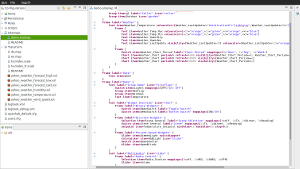
Creating a valid sitemap is perhaps openHAB's weakest point. Although, in theory, one could study the syntax of the demo sitemap and create a new one by hand, the preferred method for building a sitemap is to use openHAB Designer, which is an Eclipse plugin that is provided as a separate download from the openHAB site. openHAB Designer provides syntax highlighting, auto-completion, and other features, but little in the way of guidance or best practices. In practice, I found it considerably easier to just copy and paste snippets from the sitemaps shared on the mailing list or on various blog posts.
Naturally, it is an open question how much one should generalize from this experience (presumably, a familiarity with Xtext helps), but my guess is that if modifying a sitemap is a taxing process, users will tend to put it off or stop adding new devices. Expert installers may set up a home-automation deployment once, but hobbyists tend to tinker frequently.
The final piece of the configuration puzzle is defining any rules that govern automatic device behavior: from lights turning on at dusk to modules responding automatically whenever a motion sensor is triggered. As with sitemaps, openHAB has its own language for expressing rules—although it is not a complicated one.
Each rule must specify a set of one or more trigger conditions, then define an execution block that the openHAB server will run in response. Valid triggers can be events sent by modules on the openHAB bus, time-based events, or system events like startup and shutdown. The execution block can contain general-purpose Java code, which makes openHAB considerably more flexible than systems like OpenRemote, where the only actions available are sending commands to other modules.
Of course, this level of flexibility also means that users need to beware that insecure or buggy code in their rules can have disastrous effects on their system. The samples on the wiki include some cautionary comments about making HTTP requests and avoiding concurrency problems.
Welcome home
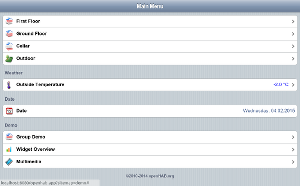
Once the configuration is complete, though, openHAB offers a lot control through its web and app interfaces. Basic manipulation of connected devices is easy, as one would expect, but openHAB's ability to embed status reports—for example, showing all open windows around the house—and graphs of sensor data (such as thermometer readings) sets it apart. My sole complaint about the web UI at this stage is that its visual look-and-feel seems designed to emulate iOS (and clearly an older iOS version, although it is hard to pin down exactly which one). There do appear to be several alternative web interfaces in development around the community, though, so perhaps all hope is not lost.
A week is hardly enough time to get to know a home-automation program. By its very nature, many of the features are only really put to the test once or twice a day. At this stage, though, openHAB's support for a wide array of hardware puts it ahead of several contemporary projects like Home Assistant and, as convoluted as openHAB sitemaps are to develop, they are still easier to work with than MisterHouse, which requires the user to write Perl functions for each device.
At the very least, openHAB offers home-automation enthusiasts the flexibility to customize their setups to match their precise needs. Moreover, the active development and user community is a boon to newcomers, as well as signifying that the project is one worth watching in the future.
New etcd, appc, and Rocket releases from CoreOS
CoreOS has become "the other Linux container startup", rivaling Docker Inc. in both advancing and controlling the specification for the rapidly evolving container-based deployment and cloud ecosystem. As part of promoting its platform and projects, CoreOS holds monthly Meetup events at Rackspace's Geekdom shared office in San Francisco. The CoreOS Meetup on January 27 turned into a release party for two CoreOS projects, etcd and the appc specification. CoreOS staff, project contributors, and a high-profile user explained what was in the new versions, as well as what each project was working on.
etcd 2.0
CoreOS CTO Brandon Philips started things off by announcing etcd 2.0, which was released on January 28. Version 2.0 includes multiple advancements, including backup and restore of the data stored in the cluster, substantial stability improvements, new configuration tools, and a bootstrapping mode for creating new clusters. As LWN explained in a previous article, etcd is a fault-tolerant, consistent, durable, distributed key-value store. CoreOS created etcd in to provide a shared configuration for a large server cluster.
Etcd 2.0 became a release candidate on December 18 and had over a month of testing. As this is the first "stable" version, project members were concerned that it be relatively bug-free and that the APIs be stable hereafter with minimal breakage.
After briefing attendees about how etcd works, Philips explained the jump in version numbers, since the previous released version of etcd was 0.4.6. The REST API for etcd, which is its primary interface, also carries a version number that was already version 2. CoreOS staff felt that it would be confusing for users to have an API version higher than the software version, so they skipped 1.0 completely.
The project is now two years old, and has received contributions from 140 people. As a project, etcd has been incorporated into many other products and projects, including Mailgun's vulcand load-balancer, the confd distributed configuration file tool, distributed Git servers, Google's Kubernetes orchestration manager, Apache Mesos, and Yodlr (see below).
The most user-visible new feature of etcd 2.0 is the new administration commands. First, "etcdctl backup" and "etcdctl restore" allows using files to backup and restore the data from a running etcd cluster cleanly and safely. Second, "etcdctl member" commands permit users to add and remove nodes from their etcd cluster without the need to change configuration files and restart the cluster.
The new version also implements a new "proxy mode" for etcd nodes. This allows users to add additional etcd servers that do not participate in consensus and failover, but instead just mirror the data available through the main nodes. This feature supports much larger etcd clusters with high read loads, such as when etcd is being used to support an infrastructure of hundreds or thousands of containers.
Less visible to users but even more important are the stability and data-integrity improvements. First, the project improved the Raft algorithm [PDF] implementation, which supports etcd server consensus and leader election, by borrowing some ideas from the CockroachDB project. The project also changed the way etcd's Write Ahead Log (WAL) is used, both to support backup, and to prevent certain kinds of data-corruption failures.
"Filesystems truncate and corrupt data," explained Philips. "We used to rewind the log, which would cause failures when the filesystem did something unexpected. We also added checksums to the log."
Because misconfiguration of a cluster is easy to do, the team added UUIDs to identify both individual nodes and the etcd cluster. This UUID is now used in every API request, in order to make sure that nodes don't attach to the wrong cluster or peer with the wrong node.
Kelsey Hightower, a contributor to etcd and a CoreOS staff member, then presented etcd's new bootstrapping features. Previously, one of the major problems was that an etcd cluster required at least two nodes to operate, but you couldn't configure etcd nodes to communicate until you had a cluster, creating a "catch-22". Version 2.0 implements a new "bootstrapping mode" that allows a new cluster to come up and establish peering.
This bootstrapping has three modes: static, DNS, and discovery-based. Static mode just uses command-line switches to tell each node what cluster to join. DNS mode uses SRV records from the DNS server to inform each etcd node of its initial cluster membership.
CoreOS's preferred mode is discovery-based, where each node is given an URL from which to obtain an initial token, and then peers with other nodes that have that token. The URL is that of a single-node etcd server, run just for the bootstrapping process. While users can run their own, CoreOS runs a public discovery key server at discovery.etcd.io in order to eliminate a step.
The etcd 2.0 launch finished with a brief presentation by Ross Kukulinski, founder of Yodlr, on using etcd to build a web application. Yodlr is a new live chat and voice collaboration tool that was created by the training team of a large company for its internal use. When customers became more interested in the chat tool than in the training, the team had to scale out the service quickly. Etcd was indispensable in coordinating user sessions across multiple servers.
The appc Standard and Rocket

Jonathan Boulle, a senior engineer at CoreOS, explained the App Container specification (appc). Both this specification, and the rkt or "Rocket" container runtime were released as version 0.2.0 on January 23. The appc team hopes that this means a stable version of the standard will be released next.
The purpose of appc is to create a universal standard for application containers, to allow them to be implemented in ways that are vendor-independent and OS-independent. Currently, the specification is supported by corporate partners Mesosphere and Pivotal, but most development and revisions are still written by the CoreOS staff.
This specification covers the four main components of how applications should be run in containers:
- Image Format: specifies the structure of the image file for the guest runtime environment. This is simply a tarball containing a root filesystem and a JSON-format manifest, as well as an image identifier.
- Image Discovery: specifies a federated namespace for image names, which use an URL-like structure.
- Executor: specifies how the runtime environment for applications works, including the handling of filesystem mounts and environment variables.
- Metadata: specifies how each executor and container offers metadata, including a container ID and Hash-based message authentication code (HMAC) key.
The new 0.2 release of the specification now includes discovery authentication for secure service discovery on shared networks. It also includes HMAC signature validation for containers, which has moved to the SHA512 algorithm in order to take advantage of processor acceleration.
Appc has also inspired a few non-CoreOS projects and implementations. One such is Jetpack, a FreeBSD application container executor created by a Polish team. There is also libappc, a C++ library for working with containers, and docker2aci, a tool for converting Docker images to appc format.
The primary implementation of appc remains rkt, or "Rocket", which is CoreOS's own container runtime, as previously covered in LWN. Rocket is the demonstration implementation of "stage 1" from the appc specification, including the container format and metadata.
The primary difference between Docker and Rocket from a user perspective
is that Docker runs as a system daemon that handles all container
management, while Rocket is implemented as a library standalone binary. The idea of Rocket is
a minimal implementation that makes use of the host OS's init system and
tools. In the CoreOS distribution, this means using systemd to manage
containers. Also, because Rocket is a library standalone program, it relies on file-based
locking rather than using a lock daemon.
Version 0.2 implements three new commands: "status" to get the status of running containers; "enter" to attach the terminal to a running container; and "gc" to perform garbage collection of dead containers. The new version also implements public key validation for trusted repository container images, which works in much the same way as the keys for Apt repositories on Debian.
Boulle also discussed and demonstrated what's currently in development for version 0.3.0. This includes an "rkt trust" command for easy key validation and improved support for group permissions and non-systemd init systems. Rocket 0.3 will also support secure image hosting via Quay.io, one of CoreOS's commercial services.
Having discussed the features, Boulle then went over some of the areas of Rocket and appc that still need work.
Rocket leverages systemd heavily, but has systemd from CoreOS bundled into the rkt binary because of varying OS-level support for systemd. While this makes Rocket easy to install currently, it causes serious problems with Linux packaging systems. Systemd needs to be decoupled, which will also make it possible to swap execution environments for Rocket.
Second, networking is still incomplete. Appc specifies a rule of "one IP address per container", but not how that IP address is to be obtained. Currently the team is working on a plugin-based system in order to support multiple ways of allocating IPs. This is part of the specification in active development.
The third major issue is that Rocket doesn't yet have any tools to build images. The plan is to have a tool, which is completely separate from the Rocket runtime, that builds images according to the appc specification. While there are several ways to create a root filesystem using Linux tools, most Rocket users create images by converting Docker images.
Conclusion
CoreOS, etcd, appc, and Rocket seem to have a strong development momentum, with rapid releases and a lot of new features and products. While the Docker/CoreOS split originally looked like it might be an iceberg in the path of Linux containerization, instead it seems to be driving intense innovation in more directions than could have been embraced by the Docker team itself. Regardless of the success of any of the individual projects, Linux users (as well as FreeBSD and illumos users) have new and rapidly evolving options for container-based deployment. No matter how it works out, it will be exciting to watch.
A look at Inkscape 0.91
The Inkscape project released version 0.91 at the end of January, a release culminating more than four years of development. The new release incorporates a lengthy list of improvements from that time period: new tools, performance enhancements, and fixes to several longstanding bugs. Just as importantly, though, it also lays the groundwork for a 1.0 release that will signify an important milestone: full SVG 1.1 support. Over the years, though, Inkscape has evolved to be more than just an SVG editor—as version 0.91 demonstrates.
What's in a number
For a bit of context, the last stable release of Inkscape was version 0.48, released in August of 2010. The follow-up release was initially supposed to be version 0.49, which we examined in late 2012. But that 0.49 release was pushed back multiple times and, in April of 2014, the project outlined a different release plan during Libre Graphics Meeting. The next stable release would be designated 0.91—a numeric bump intended to better reflect the maturity of the codebase—and the release after that would be Inkscape 1.0.
Applying the 1.0 moniker to a release is largely a public-relations issue; users unfamiliar with free-software projects may expect a pre-1.0 version number to mean that an application is unstable or unreliable—which is often not the case in the FOSS world (at least, within certain tolerances). But the 1.0 release will also signify that Inkscape has attained complete support of the SVG 1.1 specification (minus those portions of the specification that do not apply to a vector graphics editor, like interactivity).
As for the 0.91 release itself, it includes numerous updates and changes that have accumulated since 0.48, and it marks the completion of a major code-refactoring effort. Hopefully, with that work complete, the process of focusing on SVG-support features for 1.0 will proceed apace. But for anyone still using version 0.48, the improvements found in 0.91 constitute a serious upgrade in functionality.
Downloads are available from the project's web site for Linux and other operating systems. Binary packages are already available for openSUSE and Ubuntu, with other distributions said to be coming soon, in addition to source code bundles.
Drawing tools
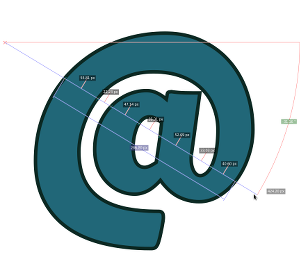
In our preview of 0.49, we discussed two entirely new tools that make their debut in the new release: an on-canvas measuring tool and the PowerStroke pen tool. Without rehashing the same explanations again, it is interesting to note that the two serve considerably different user groups.
With the measuring tool, a user can draw a line anywhere on the canvas and see the distances between every object that the line crosses. This is perhaps most useful for structured drawings where precision is of utmost importance. The PowerStroke pen, on the other hand, is an expressive instrument: users can use it to draw calligraphic strokes and shapes that change width and shape according to how much pressure is applied (if their input device is pressure-sensitive, that is).
Version 0.91 includes several other additions to the drawing features. A lot of the changes have to do with selecting and moving objects in a drawing—which gets increasingly important the more complex a drawing is. The "Align and Distribute" tool, for instance, is one of the most frequently used ways to manipulate on-canvas objects; it provides multiple ways to instantly line up or rearrange selected objects with respect to each other or to the page. In version 0.91, there are several new options, such as swapping the positions of two selected objects or rearranging the z-order stacking of selected objects.
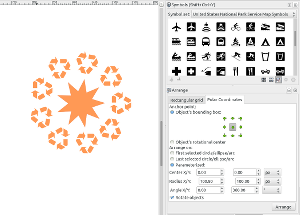
It is also now possible to arrange selected objects in radial fashion, rather than just in rows and columns. Users can also select all objects on the canvas that share a common property (such as foreground or background color). For both of those tasks, there were kludgy workarounds possible in the past, so eliminating the workarounds can be a significant time-saver. Similarly, there is now a "Clone original" feature that makes it easier to make multiple clones of an object. In the old approach, one would have to either hunt through the drawing trying to find the original among all of the clones (which is clearly difficult when dealing with clones), or else end up with some clones and some clones-of-clones (and clones-of-clones-of-clones, ad nauseam).
As was the case during the 0.49 era, the gradient tool has seen several improvements—the latest being a way to view a handy list of all of the gradients used in the current document. So, too, has the text tool. The text menu now shows all variants of the system's installed fonts (which is helpful when automatically created fake "bold" and "italic" text does not look right) and Inkscape will pop up a notification dialog listing all font substitutions it had to perform when opening the current document. Users can also get a list of all of the fonts used in a document and can select all objects using a particular font.
Last but not least, the "trace bitmap" tool now displays a live preview on the canvas as the user adjusts the settings. Live preview has been systematically rolled out to more and more features in Inkscape and, with some features, it can make all the difference in the world to see changes reflected instantly on the drawing as one adjusts sliders and checkboxes.
Interface polish
Apart from directly manipulating items on the canvas, there are a host of improvements to the general user interface. Guide lines can now be named (to help users keep them straight) and can be assigned colors (which is particularly useful when it is hard to remember which pairs of guides—like margins—are meant to go together). The control "handles" that are used to grab objects like path nodes with the mouse can now be resized, which will be a welcome change to users of high-DPI screens and touchscreens.
There are also a lot of existing features that are now accessible through the right-click menu. The list includes grouping and ungrouping objects, the fill/stroke editor, the spellchecker, and the text-and-font settings. It is tempting to say that users with large screens will benefit most from these additions by not having to scroll to the screen's edge, but in reality they are a convenience most people will enjoy.
The behavior of core dialog boxes has been polished, too. Almost all dialogs can be docked to the main window now, and all undocked dialogs remember their position and state between editing sessions. Some dialogs have even been combined (such as "Document properties" and "Document metadata").
Extensions and exports
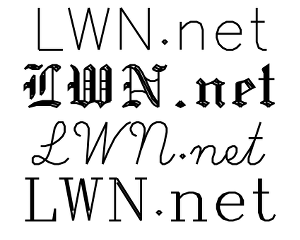
As always, the latest release includes a lot of new functionality available in extensions. Several new extensions work with text objects: "Extract text" dumps all of the text in a drawing to a separate file, "Merge text" combines selected text objects into a single object, and "Hershey text" transforms text objects into single-stroke text paths that can be drawn on a plotter or laser-cutting device.
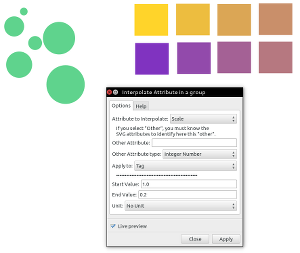
Other extensions add smaller but frequently requested features, like the ability to crop imported bitmap images or the ability to adjust colors using hue, saturation, and lightness (HSL) controls rather than the more traditional RGB values. An entirely new extension that many users may find useful is "Interpolate attribute in a group." It allows the user to select any number of objects, group them, then apply a smooth interpolation of several attributes (color, width, height, opacity, etc.) across the group. As is common to several of the new features, this could be done manually in earlier releases, but it was time-consuming and often painful to get right.
The final set of new features worth exploring all relate to generating output from an Inkscape document. Inkscape's native format is a superset of strict SVG, so users who need to export W3C-compatible SVG will be happy to hear that there is now an SVG sanity-checker built-in. PDF export now contains bleed and margin options, which simplifies production of print-ready output (and again echoes the recurring theme of building in a function that users had previously needed to perform manually). Documents can also now be saved as HTML5 <canvas> objects, which is a new feature.
Free-software users may be most pleased to learn that export to GIMP's .XCF format has received a significant upgrade in Inkscape 0.91. XCF files can now be exported at a user-defined resolution, the exported file will now preserve the names of all of the layers in the Inkscape document, and there is an option to toggle whether or not the background layer is saved to the XCF. The latter function is perhaps most useful when prototyping: a dummy background or page color may be necessary to visualize the design, but is not part of the desired output.
Under the radar
The number of new features and enhancements that can accumulate over the course of four years is enormous—even more so for Inkscape, given its robust extension system. The changes described above are by no means a comprehensive list; those needing such a list will want to read the release notes, and perhaps revisit our 2012 preview of the canceled 0.49 release.
But apart from all of the user-visible functionality in Inkscape 0.91, the long release cycle also allowed the team to undertake some behind-the-scenes improvements. The rendering speed has increased considerably thanks to that work: the on-screen rendering and PNG export were ported to Cairo and rendered objects are now cached. Applying filters is now faster, thanks to the use of OpenMP, and memory usage has been reduced (the 0.91 release notes say the reduction could be up to a factor of four, depending on the document).
Other improvements to the codebase were in the code-cleanup category: not user-visible, but helpful for developers. The project finally completed transitioning to C++, and refactored the style-handling code. The team has also begun working on automating its build processes and adding a test suite—both changes that, like code cleanup, should reap rewards in subsequent releases. And those subsequent releases are already under development: users can track the progress of the next version (which, at least for now, is designated 0.92) at the Inkscape wiki.
Although the lengthy development cycle that led up to the 0.91 release resulted in a plethora of new tools and features, the time span itself has a downside: projects that release too slowly can frustrate users or even give the appearance of being dormant. Inkscape 0.91 clearly dispels that notion. Nevertheless, project members have made it known in interviews that they hope to return to a shorter development cycle now, approaching the long-awaited (but hopefully not too distant) 1.0 release. In the meantime, though, there is a wide array of new functionality for users to explore.
Security
Fedora and "strong" passwords
Passwords are an ever-present annoyance when dealing with computers. Because they may need to be typed frequently, there is a tendency toward making them simple, but that has a large impact on the security provided by the password. Forcing users to provide "strong" passwords at install time, both for root and normal users, makes sense to some from a security perspective. To others, however, it is paternalistic and doesn't take into account users' knowledge of the risks the system will be exposed to. That debate is currently playing out in the Fedora community.
The debate flared up most recently on the fedora-test mailing list, but its roots go back further than that. The underlying problem is that the SSH daemon (sshd) is enabled after the Anaconda installer runs. It is configured such that root logins are permitted using a password, so any internet-accessible system could have its root password guessed in a brute force attack. One way to reduce the chances of that are to enforce setting a stronger root password.
Currently, Anaconda complains if a "weak" password is entered, but the installing user can click twice to confirm and use such a password. However, Anaconda developer Brian C. Lane notified testers on January 28 that Anaconda would no longer accept weak passwords and those less than eight characters long.
And on the bright side, you don't have to click done twice anymore :)
That change was driven by a suggestion to turn off root login over SSH by Prasad J. Pandit (aka P J P) back in November on the fedora-devel mailing list. In that discussion, the idea was largely met with approval, though some were not convinced that doing so really provided much in the way of added security. There was also talk of ways to get a user's SSH key added to the install, so that instead of blocking all root logins, it would only block password-based logins.
But there were also complaints that root is not the only user affected by brute force password-guessing attacks. Other accounts may not be as obvious, but if they have weak passwords, they can easily fall prey as well. Forcing installing users to create a user account that could be used for SSH purposes if root access were disabled was also seen as suboptimal. There are plenty of use cases where local user accounts are not needed or wanted.
Pandit created a Fedora feature page for the change, which was originally targeted for Fedora 22. When Fedora program manager Jaroslav Reznik brought up the change on fedora-devel in early January, though, there was considerably more dissension. As Stephen Gallagher pointed out, disabling root login over ssh may make sense for workstations, but doesn't for (typically headless) servers. Others, of course, disagreed.
A summary of the arguments for and against was posted by Pandit, but seemingly didn't change any minds. Part of the problem is that the proposal has a larger scope than simply changing the default value for the "PermitRootLogin" sshd configuration parameter. In fact, it looks at two different ways to solve the problem and makes assumptions about changes that will be made in Anaconda to support the feature, but doesn't really make them explicit. That is not really the right way to get changes into Fedora, as Adam Williamson explained:
In a project like Fedora, it doesn't always work out well to do things the way this Change seems to be going: think of one change you want to do, write up a Change for it, realize that lots of other things would have to be done to make the change viable, and just write those things into the Change as bullet points, and assume that somehow they'll be made to happen if the change is approved.
So, Pandit took the issue to the Anaconda mailing list. The discussion there quickly turned to the password-strength requirement in the installer. The idea of turning off password-based SSH logins is popular, but there is no mechanism to provide a key to Anaconda as part of the installation process. So Lane suggested the change to require longer and stronger (as measured by libpwquality) passwords.
Some were willing to live with the change, even though they may do many installs for testing purposes, but others were not so sure. Williamson, who is part of Fedora Quality Assurance (QA), complained that it would make his job harder:
Chris Murphy piled on: "I dislike this feature so much I'd rather read of
some small corner of the Internet [burning] because one of our users had
too much gin one night while configuring Fedora, used 12345 as their
root password, and the computer was made part of a giant botnet
overnight.
" Murphy suggested that "baby sitting
" users
who choose not to set a strong password is not appropriate.
In what seems like a unilateral decision, though, Lane described the change, shortly before notifying the testers that Anaconda would be changing. He also had a suggestion for those who would be affected:
Instead I propose that we increase our minimum password length to 8 characters, and disallow weak passwords. The initial pain of creating a throw-away password for your vm can be mitigated by running pwgen and writing down a nice looking one on a sticky note :)
Lane's suggestion, which runs counter to password best practices, only solves part of the problem, though. Even if someone generates a throwaway password to put on their sticky note, they may have to type it in many, many times. As Williamson put it:
So far at least, though, the Anaconda change seems to be here to stay. The notification mail set off some howls of discontent (which Williamson worked hard to tamp down) in the fedora-test mailing list. It seems possible that the whole issue will end up on Fedora Engineering Steering Committee's (FESCo's) plate at some point in the near future.
Pandit has pushed the SSH configuration change back to Fedora 23 because the user interface (UI) changes in Anaconda can't be done in the time frame needed for Fedora 22. There has been discussion of providing a way for installing users to enable root SSH logins from the Anaconda UI, but that is still a ways off. The feature also still needs to pass FESCo muster.
Providing better default security for new and/or non-savvy users is certainly a good thing. But not allowing more technical users to knowingly bypass those measures is sure to irritate them. Erecting barriers (or speed bumps) in the way of more testing seems a bit short-sighted as well. While stronger passwords do provide a measurable increase in the security of the system, it would seem that some accommodation for those who want to avoid those requirements could be made.
Brief items
Security quotes of the week
In contrast in crypto it's "Use ECC!" / "No, use RSA with an 8K key!" / "No, use AES-GCM!" / "No, use Poly1305-AES" / "No, use ECC but only with My Pet Curve!" / "No, use Ed25519" / "Camellia! Gost! Twofish! SEED! LIONs and Tigers and BEARs, oh my!", ignoring the fact that an attacker won't care what you do since they're exploiting a buffer overflow in some ancillary support library that you don't even know exists.
New vulnerabilities
bugzilla: command injection
| Package(s): | bugzilla | CVE #(s): | CVE-2014-8630 | ||||||||||||||||||||
| Created: | February 2, 2015 | Updated: | February 16, 2015 | ||||||||||||||||||||
| Description: | From the Mageia advisory:
Some code in Bugzilla does not properly utilize 3 arguments form for open() and it is possible for an account with editcomponents permissions to inject commands into product names and other attributes. | ||||||||||||||||||||||
| Alerts: |
| ||||||||||||||||||||||
clamav: heap overflow
| Package(s): | clamav | CVE #(s): | CVE-2014-9328 | ||||||||||||||||||||||||||||||||||||||||||||
| Created: | February 2, 2015 | Updated: | February 13, 2015 | ||||||||||||||||||||||||||||||||||||||||||||
| Description: | From the ClamAV 0.98.6 release announcement:
Fix a heap out of bounds condition with crafted upack packer files. This issue was discovered by Sebastian Andrzej Siewior. | ||||||||||||||||||||||||||||||||||||||||||||||
| Alerts: |
| ||||||||||||||||||||||||||||||||||||||||||||||
drupal7-context: open redirect
| Package(s): | drupal7-context | CVE #(s): | CVE-2015-1051 | ||||||||
| Created: | January 29, 2015 | Updated: | February 4, 2015 | ||||||||
| Description: | From the Red Hat bugzilla entry:
It was reported that Context UI module wasn't checking for external URLs in the HTTP GET destination parameter when redirecting users that are activating/deactivating the Context UI inline editor dialog, thereby leading to an Open Redirect vulnerability. This vulnerability is mitigated by the fact that the victim must have the permission "administer contexts" and that Context UI module must be enabled. | ||||||||||
| Alerts: |
| ||||||||||
hivex: privilege escalation
| Package(s): | hivex | CVE #(s): | CVE-2014-9273 | ||||||||||||||||||||||||||||||||||||
| Created: | February 2, 2015 | Updated: | August 4, 2015 | ||||||||||||||||||||||||||||||||||||
| Description: | From the CVE entry:
lib/handle.c in Hivex before 1.3.11 allows local users to execute arbitrary code and gain privileges via a small hive files, which triggers an out-of-bounds read or write. | ||||||||||||||||||||||||||||||||||||||
| Alerts: |
| ||||||||||||||||||||||||||||||||||||||
java: unspecified vulnerability
| Package(s): | java-1_7_0-openjdk | CVE #(s): | CVE-2015-0400 | ||||||||||||||||||||
| Created: | February 2, 2015 | Updated: | February 4, 2015 | ||||||||||||||||||||
| Description: | From the CVE entry:
Unspecified vulnerability in Oracle Java SE 6u85, 7u72, and 8u25 allows remote attackers to affect confidentiality via unknown vectors related to Libraries. | ||||||||||||||||||||||
| Alerts: |
| ||||||||||||||||||||||
kernel: denial of service
| Package(s): | kernel | CVE #(s): | CVE-2014-7822 | ||||||||||||||||||||||||||||||||||||||||||||||||||||||||||||||||||||||||||||||||||||||||||||||||||||||||||||||||
| Created: | January 29, 2015 | Updated: | February 11, 2015 | ||||||||||||||||||||||||||||||||||||||||||||||||||||||||||||||||||||||||||||||||||||||||||||||||||||||||||||||||
| Description: | From the Red Hat advisory:
A flaw was found in the way the Linux kernel's splice() system call validated its parameters. On certain file systems, a local, unprivileged user could use this flaw to write past the maximum file size, and thus crash the system. (CVE-2014-7822, Moderate) | ||||||||||||||||||||||||||||||||||||||||||||||||||||||||||||||||||||||||||||||||||||||||||||||||||||||||||||||||||
| Alerts: |
| ||||||||||||||||||||||||||||||||||||||||||||||||||||||||||||||||||||||||||||||||||||||||||||||||||||||||||||||||||
krb5: multiple vulnerabilities
| Package(s): | krb5 | CVE #(s): | CVE-2014-5352 CVE-2014-9421 CVE-2014-9422 CVE-2014-9423 | ||||||||||||||||||||||||||||||||||||||||||||||||||||||||||||||||||||||||
| Created: | February 4, 2015 | Updated: | March 9, 2015 | ||||||||||||||||||||||||||||||||||||||||||||||||||||||||||||||||||||||||
| Description: | From the Debian advisory:
Multiple vulnerabilities have been found in krb5, the MIT implementation of Kerberos: CVE-2014-5352: Incorrect memory management in the libgssapi_krb5 library might result in denial of service or the execution of arbitrary code. CVE-2014-9421: Incorrect memory management in kadmind's processing of XDR data might result in denial of service or the execution of arbitrary code. CVE-2014-9422: Incorrect processing of two-component server principals might result in impersonation attacks. CVE-2014-9423: An information leak in the libgssrpc library. | ||||||||||||||||||||||||||||||||||||||||||||||||||||||||||||||||||||||||||
| Alerts: |
| ||||||||||||||||||||||||||||||||||||||||||||||||||||||||||||||||||||||||||
libmspack: denial of service
| Package(s): | libmspack | CVE #(s): | CVE-2014-9556 | ||||||||||||||||||||||||||||||||
| Created: | February 2, 2015 | Updated: | March 16, 2015 | ||||||||||||||||||||||||||||||||
| Description: | From the SUSE bugzilla:
Jakub Wilk originally reported to the Debian BTS a problem with cabextract on a specially crafted cab file, causing cabextract to hang forever. The problem is actually in the embedded copy of libmspack, see [1]. Libmspack, a library to provide compression and decompression of some file formats used by Microsoft, is used in many project (or embedded there like also Clamav). This issue can cause a remotely exploitable denial-of-service condition due to clamav thread hanging forever while scanning the file. [1] https://bugs.debian.org/cgi-bin/bugreport.cgi?bug=773041 | ||||||||||||||||||||||||||||||||||
| Alerts: |
| ||||||||||||||||||||||||||||||||||
libvirt: information leak
| Package(s): | libvirt | CVE #(s): | CVE-2015-0236 | ||||||||||||||||||||||||||||||||||||||||||||
| Created: | February 2, 2015 | Updated: | February 17, 2015 | ||||||||||||||||||||||||||||||||||||||||||||
| Description: | From the CVE entry
libvirt before 1.2.12 allow remote authenticated users to obtain the VNC password by using the VIR_DOMAIN_XML_SECURE flag with a crafted (1) snapshot to the virDomainSnapshotGetXMLDesc interface or (2) image to the virDomainSaveImageGetXMLDesc interface. | ||||||||||||||||||||||||||||||||||||||||||||||
| Alerts: |
| ||||||||||||||||||||||||||||||||||||||||||||||
mariadb: unspecified vulnerability
| Package(s): | mariadb mysql | CVE #(s): | CVE-2015-0391 | ||||||||||||||||||||||||||||||||||||||||||||||||||||||||||||
| Created: | February 4, 2015 | Updated: | August 20, 2015 | ||||||||||||||||||||||||||||||||||||||||||||||||||||||||||||
| Description: | From the CVE entry:
Unspecified vulnerability in Oracle MySQL Server 5.5.38 and earlier, and 5.6.19 and earlier, allows remote authenticated users to affect availability via vectors related to DDL. | ||||||||||||||||||||||||||||||||||||||||||||||||||||||||||||||
| Alerts: |
| ||||||||||||||||||||||||||||||||||||||||||||||||||||||||||||||
patch: multiple vulnerabilities
| Package(s): | patch | CVE #(s): | CVE-2014-9637 CVE-2015-1196 CVE-2015-1395 | ||||||||||||||||||||||||||||||||||||||||
| Created: | February 2, 2015 | Updated: | April 6, 2015 | ||||||||||||||||||||||||||||||||||||||||
| Description: | From the Red Hat bugzilla:
CVE-2014-9637: It was reported that a crafted diff file (attached) can make patch to eat memory and later segfault. CVE-2015-1395: It was reported that the versions of the patch utility that support Git-style patches are vulnerable to a directory traversal flaw. This could allow an attacker to overwrite arbitrary files by applying a specially crafted patch, with the privileges of the user running patch. CVE-2015-1196: From the CVE entry: GNU patch 2.7.1 allows remote attackers to write to arbitrary files via a symlink attack in a patch file. | ||||||||||||||||||||||||||||||||||||||||||
| Alerts: |
| ||||||||||||||||||||||||||||||||||||||||||
rubygem-passenger: insecure use of temporary files
| Package(s): | rubygem-passenger | CVE #(s): | CVE-2014-1831 CVE-2014-1832 | ||||
| Created: | February 3, 2015 | Updated: | February 4, 2015 | ||||
| Description: | From the Red Hat bugzilla:
An upstream commit to the Passenger rubygem indicated that versions 4.0.5 and later are affected by a temporary file flaw described as follows: " Phusion Passenger creates a "server instance directory" in /tmp during startup, which is a temporary directory that Phusion Passenger uses to store working files. This directory is deleted after Phusion Passenger exits. For various technical reasons, this directory must have a semi-predictable filename. If a local attacker can predict this filename, and precreates a symlink with the same filename that points to an arbitrary directory with mode 755, owner root and group root, then the attacker will succeed in making Phusion Passenger write files and create subdirectories inside that target directory. The following files/subdirectories are created:
* control_process.pid If you happen to have a file inside the target directory called `control_process.pid`, then that file's contents are overwritten. These files and directories are deleted during Phusion Passenger exit. The target directory itself is not deleted, nor are any other contents inside the target directory, although the symlink is. " It is fixed in upstream version 4.0.33. | ||||||
| Alerts: |
| ||||||
thunderbird: code execution
| Package(s): | thunderbird | CVE #(s): | CVE-2014-8635 | ||||||||||||
| Created: | January 30, 2015 | Updated: | February 4, 2015 | ||||||||||||
| Description: | From the CVE entry: Multiple unspecified vulnerabilities in the browser engine in Mozilla Firefox before 35.0 and SeaMonkey before 2.32 allow remote attackers to cause a denial of service (memory corruption and application crash) or possibly execute arbitrary code via unknown vectors. | ||||||||||||||
| Alerts: |
| ||||||||||||||
unzip: unspecified impact
| Package(s): | unzip | CVE #(s): | CVE-2014-9636 | ||||||||||||||||||||||||||||||||||||||||||||||||||||||||||||
| Created: | January 29, 2015 | Updated: | March 29, 2015 | ||||||||||||||||||||||||||||||||||||||||||||||||||||||||||||
| Description: | From the Red Hat bugzilla entry:
It was reported that OOB access (both read and write) issues exist in test_compr_eb (extract.c) that can result in application crash or other unspecified impact. This vulnerability can be triggered via crafted zip archives with extra fields that advertise STORED method compression (i.e. no compression) and have uncompressed field sizes smaller than the corresponding compressed field sizes. | ||||||||||||||||||||||||||||||||||||||||||||||||||||||||||||||
| Alerts: |
| ||||||||||||||||||||||||||||||||||||||||||||||||||||||||||||||
virtualbox: two largely unspecified denial of service flaws
| Package(s): | virtualbox | CVE #(s): | CVE-2015-0377 CVE-2015-0418 | ||||||||||||||||
| Created: | January 29, 2015 | Updated: | February 4, 2015 | ||||||||||||||||
| Description: | From the Debian advisory:
Two vulnerabilities have been discovered in VirtualBox, a x86 virtualisation solution, which might result in denial of service. | ||||||||||||||||||
| Alerts: |
| ||||||||||||||||||
vlc: multiple vulnerabilities
| Package(s): | vlc | CVE #(s): | CVE-2014-9625 CVE-2014-9626 CVE-2014-9627 CVE-2014-9628 CVE-2014-9629 CVE-2014-9630 | ||||||||||||||||
| Created: | February 2, 2015 | Updated: | February 4, 2015 | ||||||||||||||||
| Description: | From the Debian and SUSE advisories:
CVE-2014-9625: On 32 bit builds, parsing of update status files with a size of 4294967295 or more lead to an integer truncation in a call to malloc and a subsequent buffer overflow. CVE-2014-9626: The MP4 demuxer, when parsing string boxes, did not properly check the length of the box, leading to a possible integer underflow when using this length value in a call to memcpy(). This could allow remote attackers to cause a denial of service (crash) or arbitrary code execution via crafted MP4 files. CVE-2014-9627: The MP4 demuxer, when parsing string boxes, did not properly check that the conversion of the box length from 64bit integer to 32bit integer on 32bit platforms did not cause a truncation, leading to a possible buffer overflow. This could allow remote attackers to cause a denial of service (crash) or arbitrary code execution via crafted MP4 files. CVE-2014-9628: The MP4 demuxer, when parsing string boxes, did not properly check the length of the box, leading to a possible buffer overflow. This could allow remote attackers to cause a denial of service (crash) or arbitrary code execution via crafted MP4 files. CVE-2014-9629: The Dirac and Schroedinger encoders did not properly check for an integer overflow on 32bit platforms, leading to a possible buffer overflow. This could allow remote attackers to cause a denial of service (crash) or arbitrary code execution. | ||||||||||||||||||
| Alerts: |
| ||||||||||||||||||
vorbis-tools: denial of service
| Package(s): | vorbis-tools | CVE #(s): | CVE-2014-9640 | ||||||||||||||||||||||||||||
| Created: | January 30, 2015 | Updated: | February 9, 2015 | ||||||||||||||||||||||||||||
| Description: | From the CVE entry: oggenc/oggenc.c in vorbis-tools 1.4.0 allows remote attackers to cause a denial of service (out-of-bounds read) via a crafted raw file. | ||||||||||||||||||||||||||||||
| Alerts: |
| ||||||||||||||||||||||||||||||
Page editor: Jake Edge
Kernel development
Brief items
Kernel release status
The current development kernel is 3.19-rc7, released on February 1. "Everything seems to be fairly calm and normal, so this is likely to be the last rc unless something unexpected suddenly comes up. Which means that I'd like to see more people test-booting and running this puppy just to check things out."
Stable updates: 3.18.5, 3.14.31, and 3.10.67 were released on January 29.
The 3.18.6, 3.14.32, and 3.10.68 updates are in the review process as of this writing; they can be expected on or after February 5.
Quotes of the week
Kernel development news
Linux as a single-user system
Back in the dim and distant past (2001), somebody going by the name "imel" posted a patch eliminating the concept of users in the kernel and causing everything to run as root. Unsurprisingly, this patch was not taken particularly seriously at the time. But a version of that patch has returned nearly fourteen years later; this time around it has succeeded in generating a bit more discussion.The patch in question comes from Iulia Manda; it creates a kernel configuration option that removes the concept of multi-user operation. When appropriately configured, the kernel runs every process with user and group IDs of zero and all capability bits set. This option also removes support for a long list of system calls dealing with user and group IDs and capabilities.
As is often the case with the more eyebrow-raising patches, this one is driven by the kernel "tinification" effort that seeks to shoehorn the kernel into small-memory systems. Such systems are likely to be running a single, dedicated application, perhaps as the init process, and they have little use for many of the features provided by the kernel — including multi-user operation. Configuring that support out saves a bit of memory (about 25KB), making it easier to fit a contemporary kernel on the smallest systems-on-chip.
Given the nature of the patch, it would not be surprising to see a chorus of opposition on the lists. In fact, the set of opponents consists mainly of Casey Schaufler, who said:
"Authoritative LSM hooks" are Linux security module functions that are able to increase the privilege level of a running process. They were extensively debated back in 2001 when the security module mechanism was being developed. Authoritative hooks did not make the cut in the end; they were seen as a significant security risk in their own right. At that time, one Casey Schaufler criticized the decision, seeing it as a selling-out of important functionality to ease the merging of security modules into the kernel.
Many years later, Casey clearly has not forgotten. He would apparently like to see the single-user option, if it is to be included at all, implemented as a security module using authoritative hooks. The tinification developers are unimpressed by that idea, though; reimplementing authoritative hooks would involve reviving an old (and resolved) discussion to get to a possibly inferior solution to the problem they are interested in addressing. So this patch is unlikely to evolve in that direction.
Beyond that, though, Casey raised a
complaint that has come up before with regard to tinification patches:
"You are opening the door to creating a 'Linux' kernel that does not
behave like Linux.
" Many of the patches in this area will, by their
basic nature, have that effect; they are, after all, concerned with
removing functionality that is not needed for one specific use case. If
the kernel is to be suitable for deployment on tiny systems, it will need
to be flexible enough to "not behave like Linux" on those systems.
That is one way of seeing the problem, anyway. Josh Triplett responded that it has long been possible to configure functionality out of the kernel and that the single-user patches are nothing special or new:
In the end, it comes down to a couple of questions: can the tinification developers package their changes in a way that the larger development community can accept, and is that community willing to tolerate patches that enable fundamental changes in how the kernel works? The discussion is not new, of course; it came up at the 2014 Kernel Summit among other places. It does not look like one that will come to any sort of quick conclusion. But, in the end, if Linux is not able to run well on very small systems, it will likely be pushed aside by a system that does work well in that environment.
Statistics from the 3.19 development cycle
As of this writing, the 3.19-rc7 prepatch is out and things look on track for the final 3.19 release in the near future. So it seems about time for a look at the changes that went into this release and where they came from. Once again, it has been a busy development cycle with few real surprises.There have been 12,461 changesets merged into the mainline for the 3.19 release. That is up a bit from 3.18 and fits well with the general trend toward larger changeset counts in each release, as can be seen in this simple plot:

If the final 3.19 release does happen on February 8, as seems likely, the development cycle will have been 63 days long — the third cycle in a row of that length. Development cycle length has been decreasing for some time, but, at this point, we may be close to the minimum time it takes to produce a production-quality kernel release.
The changes in the 3.19 release were contributed by 1,422 developers — almost the same as the number of contributors to 3.18. The most active of these developers are:
Most active 3.19 developers
By changesets H Hartley Sweeten 463 3.7% Wolfram Sang 333 2.7% Alexander Aring 193 1.5% Benjamin Romer 176 1.4% Lars-Peter Clausen 154 1.2% Malcolm Priestley 126 1.0% Al Viro 123 1.0% Thierry Reding 121 1.0% Takashi Iwai 118 0.9% Daniel Vetter 103 0.8% Geert Uytterhoeven 103 0.8% SF Markus Elfring 99 0.8% Johan Hedberg 98 0.8% Michael S. Tsirkin 95 0.8% Hans Verkuil 84 0.7% Peter Hurley 82 0.7% Ville Syrjälä 79 0.6% Damien Lespiau 76 0.6% Fabian Frederick 73 0.6% Steven Rostedt 71 0.6%
By changed lines Malcolm Priestley 31115 4.5% Jeff Kirsher 26025 3.7% Hans Verkuil 22602 3.3% Nicolas Ferre 22580 3.2% Paolo Bonzini 14706 2.1% Hante Meuleman 13694 2.0% H Hartley Sweeten 12445 1.8% Ley Foon Tan 10222 1.5% Takashi Sakamoto 8704 1.3% Thierry Reding 8260 1.2% Philipp Zabel 7477 1.1% Joe Perches 7268 1.0% Daniel Vetter 6584 0.9% Pratik Patel 6573 0.9% Alexander Aring 6382 0.9% Vinod Koul 6085 0.9% Finn Thain 5663 0.8% Daeseok Youn 5554 0.8% Hannes Reinecke 4951 0.7% Christoph Hellwig 4818 0.7%
There may indeed come a day, in some distant, unimaginable future, when the Comedi drivers are done and Hartley Sweeten does not contribute the most changesets to a kernel release. But that day won't happen during the 3.19 cycle. Wolfram Sang eliminated unnecessary assignments to the owner field of struct platform_driver, Alexander Aring did a lot of work on the kernel's 802.15.4 implementation, Benjamin Romer cleaned up the unisys driver in the staging tree, and Lars-Peter Clausen did a bunch of sound-driver work.
In the "lines changed" column, Malcolm Priestley topped the list with a lot of work (including the removal of a lot of code) on the vt6655 driver in the staging tree. Jeff Kirsher contributed three patches, one of which removed the old and unloved bcm driver, while Hans Verkuil, as usual, did a lot of work within the Video4Linux tree. Nicolas Ferre removed a bunch of old ARM code, and Paolo Bonzini rearranged the KVM x86 code.
The developers working on 3.19 were supported by just over 200 companies, a typical number for recent development cycles. The list of the most active companies holds few surprises:
Most active 3.19 employers
By changesets Intel 1490 12.0% (None) 1363 10.9% Red Hat 1029 8.3% (Unknown) 935 7.5% (Consultant) 617 5.0% Vision Engraving Systems 463 3.7% SUSE 437 3.5% Samsung 420 3.4% Linaro 362 2.9% Texas Instruments 284 2.3% 270 2.2% IBM 267 2.1% Renesas Electronics 261 2.1% Unisys 208 1.7% AMD 205 1.6% Free Electrons 205 1.6% Freescale 202 1.6% NVidia 153 1.2% ARM 153 1.2% Broadcom 145 1.2%
By lines changed Intel 95283 13.7% (None) 78635 11.3% Red Hat 57378 8.3% (Unknown) 43819 6.3% Cisco 25757 3.7% (Consultant) 25511 3.7% Atmel 25239 3.6% Broadcom 18189 2.6% Linaro 18071 2.6% SUSE 17898 2.6% Samsung 16295 2.3% AMD 16186 2.3% 15152 2.2% Vision Engraving Systems 13307 1.9% Free Electrons 11559 1.7% Altera 11369 1.6% IBM 11324 1.6% Code Aurora Forum 10632 1.5% Texas Instruments 10377 1.5% NVidia 9639 1.4%
The percentage of developers working on their own time is holding steady at around 11%, suggesting that the long-term decline in volunteer developers may have come to an end.
To finish things out, it has been a while since we have taken a look at the longevity of code going into the kernel — in other words, how much of the current kernel came from each development cycle? The current picture looks like this:
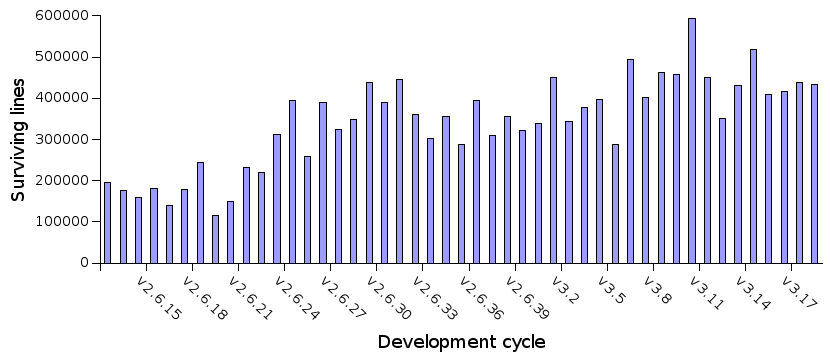
This chart was generated by running "git blame" on each file in the kernel tree and identifying the commit that created each line within the file. It starts at 2.6.13, omitting the beginning of the git era at 2.6.12 for clarity; that bar, representing the 3 million lines that have not been modified since 2.6.12, would dwarf all the others.
The story that emerges from that chart is that recent development cycles do not dramatically overshadow earlier cycles. That suggests that, once a line of code is put in place, it tends not to change much in the following cycles. Sometimes it seems that there is a lot of churn, frequently rewriting the same code, but the truth is that most of the code in the kernel has not been changed in years.
In other words, most kernel developers are busy adding new code, which is not a particularly surprising result. It takes a lot of new code to keep up with the demands for new features and support for new hardware. The evidence suggests that the kernel community is continuing to grow in response to those demands and the process is working reasonably well.
How programs get run: ELF binaries
The previous article in this series described the general mechanisms that the Linux kernel has for executing programs as a result of a user-space call to execve(). However, the particular format handlers described in that article each deferred the process of execution to an inner call to search_binary_handler(). That recursion almost always ends with the invocation of an ELF binary program, which is the subject of this article.
The ELF format
The ELF (Executable and Linkable Format) format is the main binary format in use on modern Linux systems, and support for it is implemented in the file fs/binfmt_elf.c. It's also a slightly complicated format for the kernel to handle; the main load_elf_binary() function spans over 400 lines, and the ELF support code is more than four times as big as the code that supports the old a.out format.
An ELF file for an executable program (rather than a shared library or an object file) must always contain a program header table near the start of the file, after the ELF header; each entry in this table provides information that is needed to run the program.
The kernel only really cares about three types of program header entries. The first type is the PT_LOAD segment, which describes areas of the new program's running memory. This includes code and data sections that come from the executable file, together with the size of a BSS section. The BSS will be filled with zeroes (thus only its length needs to be stored in the executable file). The second entry of interest is a PT_INTERP entry, which identifies the run-time linker needed to assemble the complete program; for the time being, we'll assume a statically linked ELF binary and return to dynamic linking later. Finally, the kernel also gets a single bit of information from a PT_GNU_STACK entry, if present, which indicates whether the program's stack should be made executable or not.
(This article only focuses on what's needed to load an ELF program, rather than exploring all of the details of the format. The interested reader can find much more information via the references linked from Wikipedia's ELF article or by exploring real binaries with the objdump tool.)
Processing ELF binaries
Loading an ELF binary is handled by the load_elf_binary() function, which starts by examining the ELF header to check that the file in question does indeed look like a supported ELF format. The handler needs the whole of the ELF program header, whether it is within the first 128 bytes read into buf in linux_binprm or not, so it needs to read it into some scratch space.
The code now loops over the program header entries, checking for an interpreter (PT_INTERP) and whether the program's stack should be executable (from the PT_GNU_STACK entry). With this preparation done, the code needs to initialize those attributes of the new program that are not inherited from the old program; the Single UNIX Specification version 3 (SUSv3) exec specification describes most of the required behavior (and table 28-4 of The Linux Programming Interface gives an excellent summary of the attributes involved).
The process of setting up the new program starts with a call to flush_old_exec(), which clears up state in the kernel that refers to the previous program. Any other threads of the old program are killed so the new program starts with a single thread, and the signal-handling information for the process is unshared so that it can be safely altered later. Any pending POSIX timers for the old program are cleared, and the location of the executable file for the program (visible at /proc/pid/exe) is updated. The virtual memory mappings for the old program are released, which also kills any pending asynchronous I/O operations and frees any uprobes. Finally, the personality of the process is updated to remove any features that could affect security, as previously recorded in the per_clear field in linux_binprm. The main handler code also calls the SET_PERSONALITY() macro to set the thread flags appropriately for a new 64-bit program.
A corresponding call to setup_new_exec() now sets up the kernel's internal state for the new program. This function starts by determining whether the new program can generate a core dump (or have ptrace() attach to it); this is disabled by default for setuid or setgid programs. Dumping is also disabled when the program file isn't readable under the current credentials. A call to __set_task_comm() sets the current task's comm field to the basename of the originally invoked filename; this value is used as a thread name, and is accessible to user space via the PR_GET_NAME and PR_SET_NAME prctl() operations. A call to flush_signal_handlers() sets up the signal handlers for the new program; any signal handler that's not SIG_IGN gets set to the default SIG_DFL value (so any ignored signals are inherited by the new program). Finally, a call to do_close_on_exec() closes all of the old program's file descriptors that have the O_CLOEXEC flag set; other file descriptors will be inherited by the new program.
The virtual memory for the new program also needs to be set up. To improve security (by helping protect against stack overflow attacks), the highest address for the stack is typically moved downward by a random offset. An initial call to setup_arg_pages() then sets up the kernel's memory tracking structures, and adjusts for the new location of the stack. The code loops through all of the PT_LOAD segments in the program file and maps them into the process's address space, setting up the new program's memory layout. It then sets up zero-filled pages that correspond to the program's BSS segment. Also, additional special pages — such as the virtual dynamic shared object (vDSO) pages — need to be mapped, which is taken care of by a call to arch_setup_additional_pages(). An empty page may also be mapped at the zero address in the program's address space for backward-compatibility reasons (old SVr4 programs apparently assume that reading from a NULL pointer would return zeros rather than SIGSEGV).
Next, the credentials for the new program are set up via a call to install_exec_creds(). This function lets any active Linux Security Module (LSM) know about the change in credentials (through the bprm_committing_creds and bprm_committed_creds LSM hooks), and the inner commit_creds() function performs the assignment.
The final preparation for running the new program is to set up the rest of its stack (in its new randomized location), by calling the create_elf_tables() function; this is described in a separate section below.
All of the preparation has now been done, and the new program can be launched. An earlier article explained how the kernel's system_call entry point pushes the user-space CPU registers to the kernel stack before entering the main kernel code, and these registers are correspondingly restored when the system call completes. The area of the stack that holds the saved registers is cast to a pt_regs structure, and the saved user-space CPU registers can thus be overwritten with suitable values (zeroes) for the start of the new program. The call to the start_thread() function also sets the saved instruction pointer to the entry point of the program (or the dynamic linker), and the saved stack pointer to the current top of the stack (from the p field in linux_binprm). The zero return code from the handler indicates success, and the execve() syscall returns to user space — but to a completely different user space, where the process's memory has been remapped, and the restored registers have values that start the execution of the new program.
Populating the stack: the auxiliary vector, environment and arguments
The create_elf_tables() function adds more information to the new program's stack, below the argument and environment information added by the generic code, as two distinct chunks. An initial call to arch_align_stack() rounds down the existing stack position to a 16-byte boundary, and may also further randomize the stack position downward slightly.
The first collection of information forms the ELF auxiliary vector, a collection of (id, value) pairs that describe useful information about the program being run and the environment it is running in, communicated from the kernel to user space. To build this vector, the handler code first needs to push onto the stack any information that doesn't fit within a 64-bit value; for x86_64 this is a platform capability description (the string "x86_64") and 16 bytes of random data (to help seed user-space random number generators).
Next, the code assembles the (id, value) pairs for the auxiliary vector in the saved_auxv space within the mm_struct. An LWN article from Michael Kerrisk describes the contents of this vector, so here we just mention a few interesting entries:
- The (architecture-specific) first entry in the vector is the AT_SYSINFO_EHDR value for x86_64; this indicates the location of the vDSO page, as referenced in an earlier article.
- The AT_PLATFORM value is the location of the "x86_64" platform capability description pushed earlier.
- The AT_RANDOM value is the location of the random data pushed earlier.
- The AT_EXECFN value holds the location of the program filename that was pushed as the very first thing on the stack (and whose location was stored in the exec field of linux_binprm), above the arguments and environment values.
- The AT_ENTRY value holds the entry point for the text segment, i.e. where program execution should start.
Once this auxiliary vector is created, the code now assembles the rest of the new program's stack. The required space is calculated, and then the entries are inserted from low addresses to higher ones:
- The argc argument count is inserted first.
- An array of argument pointers is inserted next, ending with a NULL pointer. This is where main()'s argv will eventually point.
- An array of environment pointers is inserted next, ending with a NULL pointer. This is where environ will point.
- The auxiliary vector is put at the highest address, just below the additional values it references.
Taken together, the top of the new program's address space will have contents like the following example (this page has a similar example):
    ------------------------------------------------------------- 0x7fff6c845000
     0x7fff6c844ff8: 0x0000000000000000
            _  4fec: './stackdump\0'                      <------+
      env  /   4fe2: 'ENVVAR2=2\0'                               |    <----+
           \_  4fd8: 'ENVVAR1=1\0'                               |   <---+ |
           /   4fd4: 'two\0'                                     |       | |     <----+
     args |    4fd0: 'one\0'                                     |       | |    <---+ |
           \_  4fcb: 'zero\0'                                    |       | |   <--+ | |
               3020: random gap padded to 16B boundary           |       | |      | | |
    - - - - - - - - - - - - - - - - - - - - - - - - - - - - - - -|       | |      | | |
               3019: 'x86_64\0'                        <-+       |       | |      | | |
     auxv      3009: random data: ed99b6...2adcc7        | <-+   |       | |      | | |
     data      3000: zero padding to align stack         |   |   |       | |      | | |
    . . . . . . . . . . . . . . . . . . . . . . . . . . .|. .|. .|       | |      | | |
               2ff0: AT_NULL(0)=0                        |   |   |       | |      | | |
               2fe0: AT_PLATFORM(15)=0x7fff6c843019    --+   |   |       | |      | | |
               2fd0: AT_EXECFN(31)=0x7fff6c844fec      ------|---+       | |      | | |
               2fc0: AT_RANDOM(25)=0x7fff6c843009      ------+           | |      | | |
      ELF      2fb0: AT_SECURE(23)=0                                     | |      | | |
    auxiliary  2fa0: AT_EGID(14)=1000                                    | |      | | |
     vector:   2f90: AT_GID(13)=1000                                     | |      | | |
    (id,val)   2f80: AT_EUID(12)=1000                                    | |      | | |
      pairs    2f70: AT_UID(11)=1000                                     | |      | | |
               2f60: AT_ENTRY(9)=0x4010c0                                | |      | | |
               2f50: AT_FLAGS(8)=0                                       | |      | | |
               2f40: AT_BASE(7)=0x7ff6c1122000                           | |      | | |
               2f30: AT_PHNUM(5)=9                                       | |      | | |
               2f20: AT_PHENT(4)=56                                      | |      | | |
               2f10: AT_PHDR(3)=0x400040                                 | |      | | |
               2f00: AT_CLKTCK(17)=100                                   | |      | | |
               2ef0: AT_PAGESZ(6)=4096                                   | |      | | |
               2ee0: AT_HWCAP(16)=0xbfebfbff                             | |      | | |
               2ed0: AT_SYSINFO_EHDR(33)=0x7fff6c86b000                  | |      | | |
    . . . . . . . . . . . . . . . . . . . . . . . . . . . . . . .        | |      | | |
               2ec8: environ[2]=(nil)                                    | |      | | |
               2ec0: environ[1]=0x7fff6c844fe2         ------------------|-+      | | |
               2eb8: environ[0]=0x7fff6c844fd8         ------------------+        | | |
               2eb0: argv[3]=(nil)                                                | | |
               2ea8: argv[2]=0x7fff6c844fd4            ---------------------------|-|-+
               2ea0: argv[1]=0x7fff6c844fd0            ---------------------------|-+
               2e98: argv[0]=0x7fff6c844fcb            ---------------------------+
     0x7fff6c842e90: argc=3
Note that although there are two randomizations in the stack layout (the position of the top of memory and the size of the gap between the argument values and the auxiliary vector), the newly running program can still figure out where all of the information on the stack is. The SP register tells the program where the top of the stack is (i.e. the lowest address), and the command-line arguments are arranged upwards in memory from there, with a NULL pointer to mark where they end. The environment values are found next, again with a NULL pointer to terminate, and the auxiliary vector is found at the next consecutive addresses, closing with an AT_NULL ID. The values found within all of this information give the addresses of the argument strings, environment strings, and auxiliary data values, so no explicit information about the size of the random gap is needed.
Dynamically linked programs
So far we've assumed the program being executed is statically linked and skipped over steps that would be triggered by the presence of a PT_INTERP entry in the ELF program header. However, most programs are dynamically linked, meaning that required shared libraries have to be located and linked at run-time. This is performed by the runtime linker (typically something like /lib64/ld-linux-x86-64.so.2), and the identity of this linker is specified by the PT_INTERP program header entry.
To cope with a runtime linker, the ELF handler first reads the ELF interpreter file name into scratch space, then opens the executable file with open_exec(). The first 128 bytes of the file are read into the bprm->buf scratch area, replacing the contents of the original program file and allowing access to the ELF header of the interpreter program — which must therefore be an ELF binary itself, rather than any other format.
After the program code has been loaded into memory as described previously, the ELF handler also loads the ELF interpreter program into memory with load_elf_interp(). This process is similar to the process of loading the original program: the code checks the format information in the ELF header, reads in the ELF program header, maps all of the PT_LOAD segments from the file into the new program's memory, and leaves room for the interpreter's BSS segment.
The execution start address for the program is also set to be the entry point of the interpreter, rather than that of the program itself. When the execve() system call completes, execution then begins with the ELF interpreter, which takes care of satisfying the linkage requirements of the program from user space — finding and loading the shared libraries that the program depends on, and resolving the program's undefined symbols to the correct definitions in those libraries. Once this linkage process is done (which relies on a much deeper understanding of the ELF format than the kernel has), the interpreter can start the execution of the new program itself, at the address previously recorded in the AT_ENTRY auxiliary value.
Compatibility with other architectures
As described previously, a modern 64-bit (x86_64) Linux system can also support running 32-bit binaries of two types: normal 32-bit binaries (x86_32), and x32 ABI programs (which can make use of additional x86_64 registers). So how does the kernel support these binaries?
The key file that provides support for these formats is compat_binfmt_elf.c, which is included in the kernel when the CONFIG_COMPAT_BINFMT_ELF config option is set. This file didn't appear in our earlier list of places that register binary handlers, because the file contains almost no code of its own. Instead, it includes the main binfmt_elf.c ELF handler code (using #include), and uses the preprocessor to redirect various internal functions and values to 32-bit compatibility versions. Other than these changes, the format handler therefore behaves the same as the normal ELF handler described above.
One set of changes uses 32-bit versions of the structures describing the layout of the ELF file; similarly, the appropriate constant values for 32-bit binaries are used, which ensures that the compatibility handler only claims support for the relevant ELF binary types. In particular, the elf_check_arch() call is replaced with a compat_elf_check_arch() version that checks for either x86_32 or (if configured) x32.
The preprocessor changes also redirect some of the inner functionality of the ELF handler code. The invocation of the SET_PERSONALITY() macro is redirected to set_personality_ia32() so that the relevant thread flags for the 32-bit architecture are set and, similarly, the arch_setup_additional_pages() function is replaced with a version that sets up a 32-bit vDSO. More significantly, the start_thread() function is replaced with compat_start_thread(), which maps to start_thread_ia32(). This alters the arguments to the inner start_thread_common() function so that the saved segment registers are initialized differently than for x86_64 binaries (and the ELF_PLAT_INIT() macro is also adjusted to match).
Epilogue
Every program that runs on a Linux system passes through the portal of execve(); as such it's a key piece of kernel functionality that's worth understanding in detail. Although the kernel natively supports script and other machine-code format programs, program execution on a modern Linux system eventually involves running an ELF binary. ELF is a complicated format, but fortunately the kernel can ignore most of that complexity — it only needs to understand just enough ELF to load segments into memory, and to invoke a user space run-time linker program to finish the job of assembling a complete running program.
Patches and updates
Kernel trees
Architecture-specific
Core kernel code
Development tools
Device drivers
Device driver infrastructure
Documentation
Filesystems and block I/O
Memory management
Networking
Security-related
Miscellaneous
Page editor: Jonathan Corbet
Distributions
FreeNAS — network-attached storage with ZFS
Thus far, this series has looked at Linux distributions that are optimized for network-attached storage (NAS) deployments. This installment will take a slightly different turn: the system under review (FreeNAS) is indeed a free distribution for NAS applications, but it is based on FreeBSD rather than Linux. In many ways it looks like the Linux-based systems reviewed previously, but there are some interesting differences.FreeNAS might be thought of as the old-timer among extant NAS-oriented systems; it got its start in 2005. In recent years, it has been managed by iXsystems, which is using it as a platform for the sales of server systems and support services. As a result of both its age and the investment from iXsystems, FreeNAS seems, in many ways, to be the most mature and feature-complete system of this type.
Of course, to some, "mature" can mean "old and bloated." Your editor was
duly concerned when he read that the FreeNAS 9.3 release requires a minimum
of 8GB
of memory — the test server used for these reviews, after all, only has 2GB
of memory installed. "Using less than 8GB is an 'at your own risk'
adventure and not recommended or supported
" is the advice given on
the
9.3 announcement page. In truth, though, there were no noticeable
performance problems resulting on such a "small" system with moderate
stress testing. There are almost certainly workloads that require much
more memory, but FreeNAS can do basic file serving with 2GB.
Installation and setup were reasonably straightforward. There was a snag when the system required the existence of an LDAP or NIS server for user account information; unlike some other systems, FreeNAS expects management of user accounts to be done elsewhere. Interestingly, the system also wants to set itself up as its own certificate-creating authority. That enables the easy use of TLS to talk to the web-based administrative system, with the usual "untrusted certificate" warnings to get past.
One place where FreeNAS feels immediately different is that it takes far longer to boot (minutes rather than seconds) than any of the other systems tested. It would seem that the focused effort that has gone into reducing Linux boot times has not been replicated in the FreeBSD world. One hopes, of course, that a file server would not require booting often, but, by the same token, when the file server is down, one generally wants it to come back up quickly.
 The management of storage space is similar to that found on Rockstor, but
the terminology is different. One organizes physical drives into
"volumes," which are then used to host one or more "datasets." A dataset
is, of course, a filesystem with another name. These filesystems, once
created, can then be exported to the net via the usual protocols (NFS,
CIFS, AFP, etc.).
FreeNAS, being based exclusively on the ZFS filesystem, can offer the usual range of next-generation filesystem features. Physical drives can be organized into a number of RAID setups, though the FreeNAS system tries to hide and automate that organization to some extent. Snapshotting of filesystems is supported, and the system can be configured to make scheduled snapshots automatically. There is a deduplication feature, but actually using it requires vast amounts of RAM (3-5GB, evidently, for each terabyte of stored data). Encryption is supported at the volume level, and compression is supported at the dataset level.
Disks can be added to and removed from volumes, of course, as long as the
constraints set by the current RAID level and free space allow. There are
also useful
instructions on how to replace a failed drive; one hopes to never need
them, but it would be a good idea to always know where they are. FreeNAS
can be configured to do regular SMART testing of drives and to report on
 any problems that are found. There is also a dialog for the
configuration of power-management-options.
There is a set of screens for monitoring the performance of the system. The usual parameters, such as CPU usage, network bandwidth, and disk I/O bandwidth are all displayable in a graphical form. There is a set of zoom and shift buttons for zeroing in on specific time periods.
FreeNAS has a plugin feature to allow for extensions to the system, and there is a reasonably substantial list of available plugins. These are dominated by streaming media servers, but there are some others as well; one plugin will set up a FreeNAS box as an ownCloud server, for example. The FreeBSD "jails" feature is used to confine plugins.
 As a whole, the FreeNAS administrative interface has the feel of something
that has been under development and in active use for some time; there are a
lot of features to be found if one looks. More than any other
system tested, FreeNAS seems set up for administration without ever needing
to go to the command line. Should it become necessary to type commands
anyway, though, there is even a terminal emulator built into the web
interface; one need not SSH into the server first. For those wanting a
lower level of control, there is an
extensive API for telling FreeNAS what to do.
One place where things perhaps fall a bit short is with updates. A FreeNAS update requires updating the entire system, so it is not something one will want to do often. There does not appear to be any sort of security update stream; one must update to a newer release to get security fixes. In general, a NAS box should not normally be exposed to the Internet, but there are still reasons for wanting to keep one secure.
The corporate presence behind FreeNAS has its advantages and
disadvantages. At the top of the list of advantages, of course, is that
the community gets a highly functional and mature system for the management
of network-attached storage. The fact that iXsystems appears to be
successful also suggests that FreeNAS will be around and supported for some
time. On the other side, one must deal with the
iXsystems logo all over the administrative screens and occasional attempts
to make sales to users. Some of the company's communications (example:
"We make FreeNAS for when storage is non-critical
" versus
"We make TrueNAS for enterprise stability
") resembles that
which came out of Red Hat in the early days of its enterprise
distribution. For most users, those will be small costs to pay.
In the end, one might choose FreeNAS for its stability, and for the features offered by the ZFS filesystem. A FreeBSD-based system will feel unfamiliar to those who are used to Linux, but the Linux-based alternatives may be seen to lack either the next-generation functionality or the relative maturity of FreeNAS. While those Linux-based systems are also fine NAS servers, there are certainly good reasons why FreeNAS appears to be the default choice for many users setting up a NAS system.
Brief items
Distribution quotes of the week
Calamares 1.0
Version 1.0 of Calamares, a distribution-independent installer framework, has been released. "The initial idea for Calamares popped up in May 2014, less than a year ago, and out of frustration: many successful independent Linux distributions came with lackluster installers, and all of these installers were a result of competition rather than cooperation. Improving one of the existing installers wouldn't have fixed this, as every installer was more or less distribution specific. We wanted to create a product that would satisfy the requirements of most Linux distributions, developed as an upstream project for all of them." See this blog post for more details.
FSF adds Guix System Distribution to list of endorsed distributions
The Free Software Foundation (FSF) has announced the addition of the Guix System Distribution to its list of recommended GNU/Linux distributions. "As the name suggests, at the heart of the Guix System Distribution is the GNU Guix (pronounced like "geeks") package management system. GNU Guix offers users uncommon features such as transactional upgrades and rollbacks, as well as declarative operating system configuration."
Distribution News
Debian GNU/Linux
Debian Project mourns the loss of Clytie Siddall
The Debian Project has announced that it has lost a member of its community. Clytie Siddall passed recently after a long battle with Myalgic Encephalomyelitis/Chronic Fatigue Syndrome. "Clytie was a contributor of Vietnamese translations to Debian and other projects for many years. Within Debian she worked on translations for the installer, dpkg, apt and various documentation. She also contributed translations within the GNOME community and many other projects. Clytie was a GNOME foundation contributor."
Fedora
Results from Fedora's FESCo election
The Fedora project has announced the results from this year's election for members of its engineering steering committee (FESCo). The winning candidates are Kevin Fenzi, Adam Jackson, Tomas Hozza, Parag Nemade, and Debarshi Ray.
openSUSE
openSUSE 12.3 has reached end of SUSE support
SUSE-sponsored support of openSUSE 12.3 is now officially discontinued. Users are encouraged to upgrade. openSUSE 13.1 and 13.2 are supported.
Newsletters and articles of interest
Distribution newsletters
- DistroWatch Weekly, Issue 595 (February 2)
- 5 things in Fedora this week (February 3)
- Gentoo Monthly Newsletter (January)
- Red Hat Developer Newsletter (January)
- Ubuntu Weekly Newsletter, Issue 402 (February 1)
CoreOS 'Rockets' Ahead With Docker Alternative (eWeek)
eWeek takes a look at CoreOS, its Rocket effort, and etcd. "A key part of the CoreOS platform is the etcd system, which provides a shared configuration and scheduler coordination capability that is enabled by a distributed, consistent key-value store. As an open-source effort led by CoreOS, etcd is also used in the Google Kubernetes project as well as Pivotal's Cloud Foundry and Apache Mesos. On Jan. 28, CoreOS announced etcd version 2.0 and tagged it as the first major stable release of the technology. Prior to etcd 2.0, the most recent version was 0.4.6."
You're the Boss with UBOS (Linux Journal)
Doc Searls takes a look at UBOS, on Linux Journal. "UBOS is a new Linux distro that I like for two reasons. One is that it works toward making it easy for muggles to set up their own fully independent personal home servers with little or no help from wizards. The other is that it comes from my friend Johannes Ernst. It's in beta at the time of this writing, and it runs on PCs, Raspberry Pi models B and B+, and on Macs in VirtualBox. It's been tested with ownCloud, Known, WordPress, Mediawiki, Selfoss, Shaarli and Jenkins and plugins for a number of those."
Page editor: Rebecca Sobol
Development
Plotting tools for Linux: matplotlib
In our last installment, we introduced gnuplot, which is a standalone, language-agnostic plotting and analysis system. If you're using Python for data analysis, science, or statistics—or if you are considering it—you will want to know about matplotlib, a library that lets you produce publication-ready plots of all kinds, directly from your Python code. In contrast with the standalone gnuplot, matplotlib is a Python library, defining a large number of functions for you to use in your Python programs and from the interactive Python prompt.
Libraries and standalone programs each have their virtues and vices; which kind of solution you choose depends on your workflow, collaboration situation, plans, and inclinations. The tradeoffs are similar to choosing between a general-purpose database and a language-specific object storage system for persistent data. Standalone systems can be used from any language or a variety of languages at the same time, and they can be chosen on the basis of their performance and reliability—with little regard to the language in use.
A language-specific system can offer the programmer more fluency, flexibility, and control, and will generally require less training. When you become familiar with the matplotlib system, you will be able to use it to express the results of any Python program in graphical form.
Matplotlib, SciPy, NumPy, and all that
A swirl of names and packages has accumulated in the world of scientific Python that can be confusing to someone trying to navigate the territory for the first time. Let’s try to disentangle the terminology.
The first layer above Python itself is NumPy. This is really what makes science and data analysis with Python possible. NumPy enhances Python with an array type and extends the usual mathematical operators to act elementwise on arrays. The library also provides other linear algebra operations such as inner products, and higher-level functions including such things as Fourier transforms. It’s all implemented in C or Fortran, and is quite fast. NumPy has superseded the Numeric and numarray libraries.
Matplotlib is the extensive plotting library that is the subject of this article. The data to be plotted in matplotlib is provided in the form of NumPy arrays. The plotting functions also accept lists, but convert them to arrays.
PyLab is a module designed to make interactive computing with NumPy and matplotlib more convenient. We'll have more to say about this one below.
Pyplot is a submodule of matplotlib that provides one of its two major interfaces; there will be plenty of pyplot later on.
SciPy is a large collection of packages (the project itself calls it an "ecosystem") for doing science and mathematics with Python. SciPy bundles together all the libraries mentioned in this section and adds packages for symbolic math, data analytics, and numerical computing (special functions, statistics, integration, and much more).
Everything mentioned in this section is free and open source, widely used, and under active development.
Installation
There are a surprisingly large number of ways to install matplotlib. Of course, you need Python, as well as NumPy, and you probably want the advanced interactive shell IPython, which makes working with Python in general—and matplotlib in particular—far more convenient than the standard read–eval–print loop (REPL).
Python is already present in most Linux distributions, and there is a good chance you already have NumPy as well. If you don't, it will most likely be available from your package-management system. If not, or if the version there is too old, you can download and compile the sources. Matplotlib supported only Python 2 until the end of 2012, but as of version 1.2 supports Python 3 as well.
The same strategies apply to IPython and matplotlib itself. Both of these can also be installed with pip (a Python package management utility).
Alternatively, you can get everything you need by installing SciPy. Yet another route is to download a precompiled bundle of packages put together by a commercial entity and provided free of charge; at the moment there are several of these (the most well-established being Enthought). The obvious disadvantages of downloading one of these large environments are, first, that you will likely be installing plenty of stuff that you don't need and, second, that you have no control over the versions of the various components. But this approach can be very convenient.
As a case study, I offer my own installation strategy, on my laptop running Ubuntu 12.04: I have Python, IPython, and NumPy from the standard Ubuntu repositories. The matplotlib version available from those repositories was too old (meaning merely that I wanted some recently added features), so I downloaded the tarball of the latest stable version (1.4.2). It would not compile, because my version of pyparsing was too old, but a more recent version was available through pip. With this in place, a simple python setup.py install gave me the version of matplotlib used for all the examples in this article.
Using matplotlib
In order to create a simple plot of the sine and cosine functions, as shown here, we can run the Python program below:
    import numpy as np
    from numpy import pi
    import matplotlib.pyplot as plt

    x = np.arange(-pi, pi, pi/1000)
    y1 = np.sin(x)
    y2 = np.cos(x)
    plt.title("Circular Functions")
    plt.xlabel("x")
    plt.ylabel("y")
    plt.plot(x, y1)
    plt.plot(x, y2)
    plt.grid(True)
    plt.show()
The first three lines import NumPy (which is always required), a math constant from NumPy, and the pyplot matplotlib submodule. Then, x is set up as a NumPy array by specifying its start, end, and interval. The lines defining the y1 and y2 arrays make use of the elementwise action of the functions from the NumPy library: there is no loop, map, or list comprehension required. The three lines after that cause the title and axis labels to appear on the graph. Finally, we turn on the gridlines and cause the graph to be displayed in its own window.
The style of programming shown here is neither functional nor object-oriented. The use of the pyplot functions manipulate an implicit global state that defines attributes of the current graph, which comes into existence with the first call to a pyplot function. If this script is saved on disk and run with the Python interpreter, a window will pop up containing the plot and some interactive controls. This is a side-effect of the final line. The plot window will remain open until the program is killed. Its controls allow you to perform several kinds of adjustments to the graph and to save a permanent copy in any of several formats.
The reason that pyplot employs this unorthodox programming style is to provide a convenient interface for interactive exploration, as well as offering a familiar environment for people coming from MATLAB.
If you are using matplotlib to explore, you will benefit from using IPython, which provides a special mode designed to work smoothly with pyplot. To invoke this interface, put IPython into PyLab mode, either by starting it up with ipython --pylab or starting it normally and entering the magic %pylab command at the prompt.
In PyLab mode, the first pyplot command puts up a plot window, but the interpreter remains unblocked, so you can continue to enter commands. Each pyplot command then updates the plot immediately. In addition, pyplot and NumPy are loaded into the namespace, so you can type things like title("The title") without a prefix. The overall interactive experience is similar to working at the gnuplot prompt, but with the entire Python language available, and without having to ever type replot.
To turn this script into one that saves the plot in a file, simply change the last line to indicate the path and format you want with an extension. For example, plt.savefig('figure.png') saves the plot in a PNG file.
There are several approaches to altering the details and appearance of the plot. For global changes in style, you can use matplotlib's stylesheet support: inserting the command plt.style.use('dark_background') does just what it sounds like, for example. There is even an option available to make xkcd-like, pen-and-ink–style graphs. For more detailed control, you can add keywords to some of the plot commands. For example, if we replaced the second plot command in our script above with plt.plot(x, y2, linewidth=2.0), the cosine curve would be plotted with a thicker line.
For even more detailed control, matplotlib supplies an object-oriented interface that allows every property of every element of the graph to be controlled (using getters and setters). This is where you must turn if you have a problem that can not be solved through the pyplot interface, or if you're interested in creating a specialized and nonstandard type of plot. We don't have enough space to delve into this layer of matplotlib, but the documentation is pretty good. Nevertheless, we do need to explore the edges a bit in order to make 3D plots.
The third dimension
Matplotlib has excellent support for surface, image, contour, vector, and other kinds of plots beyond 2D curves. Here is a minimal example that creates a surface plot:
    from mpl_toolkits.mplot3d import Axes3D
    from matplotlib import cm
    import matplotlib.pyplot as plt
    import numpy as np
    from numpy import pi, sin, exp

    pr = 20.
    yend = 4.0
    x = np.arange(0, pi, pi/pr)
    y = np.arange(0, yend, yend/pr)
    x, y = np.meshgrid(x, y)
    z = exp(-y)*sin(2*x)
    ax = plt.figure().gca(projection='3d')
    ax.set_xlim(0, pi)
    ax.set_ylim(0, yend)
    surf = ax.plot_surface(x, y, z, rstride=1, cstride=1, cmap=cm.coolwarm)
    plt.show()
There are a couple of additional imports here. Axes3D is a separate module, distributed with matplotlib, that handles perspective plotting of meshes and surfaces. The cm module defines color palettes; we're going to pick one to color our surface.
Next, we establish our NumPy coordinate arrays as before. We take advantage of the convenient NumPy meshgrid function, which takes two 1D coordinate arrays and expands them to create a 2D coordinate matrix. z is the value that defines the surface, again defined with the help of NumPy's elementwise math.
The line after the calculation of z sets ax to be an axes object. This is the matplotlib object that directly contains most of the plot elements, defines the coordinate system, and that you most often deal with when using matplotlib's object-oriented interface. In the following two lines, we set the axis limits by using the setter interface. The final lines plot the surface in an interactive window as before.
Now the controls allow you to rotate the 3D plot around two axes. The rstride and cstride arguments determine how often the matrix of values is sampled to make the plot (r and c stand for row and column) and the cmap argument defines the palette for translating z values to colors. The image to the left is what we get.
LaTeX support
While matplotlib's involvement with LaTeX is not as intimate as gnuplot's, there is still excellent support for using TeX syntax and layout to typeset graph labels and some support for including graphs in documents.
The TeX typesetting algorithms have been reimplemented in matplotlib, which also ships with a collection of TeX fonts. In order to use LaTeX syntax to place text on the graph, just use the same calls as usual, and place the LaTeX between dollar signs. You will need to use raw strings for the labels, denoted in Python with an r before the string, to avoid having all of LaTex's backslashes interpreted as escape sequences:
    import numpy as np
    from numpy import pi, sin, exp
    import matplotlib.pyplot as plt

    x = np.arange(0.03, 1, 0.0001)
    y = sin(1/x) * exp(-x)
    plt.xlabel(r"$x$", fontsize = 18)
    plt.ylabel(r"$\mathcal{F}$", fontsize = 18)
    plt.text(0.25, 0.75, r"$\mathcal{F} = e^{-x}\sin(\frac{1}{x})$", fontsize = 24)
    plt.plot(x,y)
    plt.show()
This gives us the following:
Notice the standard LaTeX syntax leading to typeset results that look just like real LaTeX. If matplotlib's implementation of LaTeX is not sufficient for your application, there is an option to call out to LaTeX—but, of course, this means you need to have LaTeX installed.
PGF is a macro package included with most large LaTeX installations. It is usually used in conjunction with its syntax layer TikZ, together providing a domain-specific language for generating all kinds of diagrams directly from LaTeX. Matplotlib can save graphs in PGF format: doing so will create a file full of PGF commands rather than an image file.
Let's try to reproduce our example from the previous article in this series, where we used a special gnuplot terminal to include a graph in a LaTeX document. First, here is the Python script that creates the graph file:
    import numpy as np
    from numpy import exp, sqrt, pi
    import matplotlib.pyplot as plt

    x = np.arange(-4, 4, 0.001)
    s = 1
    y1 = exp(-x**2/(2*s**2))/(s*sqrt(2*pi))
    s = 2
    y2 = exp(-x**2/(2*s**2))/(s*sqrt(2*pi))
    plt.text(-3.5, .34, r'$\frac{1}{\sqrt{2\pi}\sigma}\,e^{-\frac{x^2}{2\sigma^2}}$', fontsize = 30)
    plt.text(0.95, .3, r'$\sigma = 2$', fontsize = 24)
    plt.text(2.7, .1, r'$\sigma = 2$', fontsize = 24)
    plt.plot(x, y1)
    plt.plot(x, y2)
    plt.savefig('normal.pgf')
This should all be familiar by now; the only thing new is the pgf file extension. After running this, the file normal.pgf will be an ASCII file full of PGF macro commands, suitable for inclusion in a LaTeX file (using input):
    \documentclass{article}
    \usepackage{graphicx}
    \usepackage[rflt]{floatflt}
    \usepackage{pgf}
    \pagestyle{empty}
    \begin{document}
    \begin{floatingfigure}{2.9in}
    \resizebox{2.5in}{!}{\input{normal.pgf}}
    \end{floatingfigure}
    \noindent The figure on the right illustrates the normal, or Gaussian distribution,
    \[ {\cal N}(x; \sigma) = \frac{1}{\sqrt{2\pi}\sigma}\,e^{-\frac{x^2}{2\sigma^2}} \]
    plotted for two values of the standard deviation, $\sigma$.
    According to the central limit theorem, certain other probability distributions,
    including the binomial distribution, tend
    to the normal distribution in the limit of a large ``sample size.''
    \end{document}
If you process this with LaTeX, the output should look like this:
Conclusion
If you're committed to Python for data science or for post-processing the results of experiments or simulations, matplotlib is an obvious choice. It has become a completely mature solution for any kind of publication-quality technical graphics. We could only scratch the surface here, but matplotlib makes it easy to produce not only all the usual scientific plots, but such things as bar and pie charts as well.
While matplotlib has grown into a fairly huge and complex set of libraries, the documentation is pretty good and its wide adoption means help is easy to come by. Finally, it's easy to start with simple things and learn more as the need arises.
Brief items
Quotes of the week
LibreOffice 4.4 released
The LibreOffice 4.4 release is now available. "We have completed the dialog conversion, redesigned menu bars, context menus, toolbars, status bars and rulers to make them much more useful. The Sifr monochrome icon theme is extended and now the default on OS X. We also developed a new Color Selector, improved the Sidebar to integrate more smoothly with menus, and reworked many user interface details to follow today’s UX trends." See the release notes and this posting from Michael Meeks for lots more information.
LXC 1.1 released
Version 1.1 of LXC Linux containers has been released. Highlights of the new release include checkpoint/restore support through CRIU, support for running systemd as the init system of a container, and updated init scripts.
Plasma 5.2 Is Beautiful and Featureful (KDE.News)
We are a bit late in noting that KDE has released Plasma 5.2 on January 27. This KDE.News article gives a tour of the desktop that will be featured in upcoming Kubuntu and Fedora KDE spin releases (and probably other distributions as well). There are lots of new features and bug fixes in the release, see the changelog for all the details. "In the screen locker we improved the integration with logind to ensure the screen is properly locked before suspend. The background of the lock screen can be configured. Internally this uses part of the Wayland protocol which is the future of the Linux desktop. There are improvements in the handling of multiple monitors. The detection code for multiple monitors got ported to use the XRandR extension directly and multiple bugs related to it were fixed."
xorg-server 1.17.0 available
Keith Packard has announced the release of xorg-server version 1.17.0. New since 1.16 are Glamor optimizations and the merging of the modesetting driver into the main codebase.
Newsletters and articles
Development newsletters from the past week
- What's cooking in git.git (February 3)
- LLVM Weekly (February 2)
- OCaml Weekly News (February 3)
- OpenStack Community Weekly Newsletter (January 30)
- Perl Weekly (February 2), followed by an addendum on February 3.
- Python Weekly (January 30)
- Ruby Weekly (January 29)
- This Week in Rust (February 2)
- Tor Weekly News (February 4)
- Wikimedia Tech News (February 2)
Inkscape 0.91 released (Libre Graphics World)
Libre Graphics World looks at the Inkscape 0.91 release and talks with the developers. "Needless to say, Inkscape 0.91 does feel like a major improvement over the previous version. And yet, if you've been around for long enough, there are some important questions you can't help yourself asking. So we spoke to Bryce Harrington and Tavmjong Bah, both Inkscape Board members and long-time contributors to the project."
Page editor: Nathan Willis
Announcements
Brief items
OPW becomes Outreachy
The effort formerly known as the FOSS Outreach Program for Women has just been rebranded as Outreachy and moved under the Software Freedom Conservancy's organizational umbrella. "The upcoming round of internships is open to women (cis and trans), trans men, genderqueer people, and all participants of the Ascend Project regardless of gender. We are planning to expand the program to more participants from underrepresented backgrounds in the future."
Libreboot X200 laptop now FSF-certified to respect your freedom
The Free Software Foundation (FSF) has awarded Respects Your Freedom (RYF) certification to the Libreboot X200 laptop. "The Libreboot X200 is a refurbished and updated laptop based on the Lenovo ThinkPad X200. In order to produce a laptop that achieved the Free Software Foundation's certification guidelines, the developers at Gluglug had to replace the low-level firmware as well as the operating system. Microsoft Windows was replaced with the FSF-endorsed Trisquel GNU/Linux operating system, which includes the GNOME 3 desktop environment. The free software boot system of Libreboot and the GNU GRUB 2 bootloader were adapted to replace the stock proprietary firmware, which included a BIOS, Intel's Management Engine (ME) system, and Intel's Active Management Technology (AMT) firmware."
2014 LinuxQuestions.org Members Choice Award Winners
The LinuxQuestions.org Members Choice Award Winners have been announced. There was three-way tie for Desktop Distribution of the Year with Linux Mint, Slackware, and Ubuntu topping the list. There are 32 categories in all.
Articles of interest
Free Software Supporter - Issue 82, February 2015
The February edition of the Free Software Foundation's newsletter covers Happy GNU year 2015!, LibrePlanet 2015, "User Liberation" video, interview with Aaron Wolf of Snowdrift.coop, new GNU releases, and much more.FSFE Newsletter – February 2015
The Free Software Foundation Europe's newsletter covers I ♥ Free Software day (on February 14), Fellowship elections, and several other topics.You can now petition the European Union to 'fix my document' (Opensource.com)
Opensource.com covers an effort, initiated by Open Forum Europe (OFE), to help the European Union (EU) institutions live up to their commitments to support open document formats when communicating with the public. "Inspired by the pothole identification and alert site and app, fixmystreet.com, OFE, through its fixmydocuments.eu, is giving a crowd-sourced voice to public frustration with software interoperability limitations that stand in the way of citizens who are seeking to communicate and interact with government. It should be noted, however, this is more than a vehicle through which to vent. Many parts of the EU are legitimately working hard to implement ODF, the open document format for office applications. Fixmydocuments.eu will help them better identify software and documents that are presenting the most pressing and immediate problems. As an added benefit, it should not go unnoticed that more fully deploying ODF and other open standards will help the EU avoid vendor lock-in."
New Books
No Starch Press and Humble Bundle Present the Brainiac Book Bundle
No Starch Press has joined Humble Bundle to present the Humble Brainiac Book Bundle.
Calls for Presentations
CFP Deadlines: February 5, 2015 to April 6, 2015
The following listing of CFP deadlines is taken from the LWN.net CFP Calendar.
| Deadline | Event Dates | Event | Location |
|---|---|---|---|
| February 6 | July 27 July 31 |
OpenDaylight Summit | Santa Clara, CA, USA |
| February 8 | April 9 April 12 |
Linux Audio Conference | Mainz, Germany |
| February 9 | May 18 May 22 |
OpenStack Summit | Vancouver, BC, Canada |
| February 10 | June 1 June 2 |
Automotive Linux Summit | Tokyo, Japan |
| February 12 | June 3 June 5 |
LinuxCon Japan | Tokyo, Japan |
| February 15 | March 1 March 6 |
Circumvention Tech Festival | Valencia, Spain |
| February 15 | May 1 May 4 |
openSUSE Conference | The Hague, Netherlands |
| February 16 | May 12 May 13 |
PyCon Sweden 2015 | Stockholm, Sweden |
| February 16 | April 13 April 14 |
2015 European LLVM Conference | London, UK |
| February 20 | March 26 | Enlightenment Developers Day North America | Mountain View, CA, USA |
| February 20 | May 13 May 15 |
GeeCON 2015 | Cracow, Poland |
| February 24 | April 24 | Puppet Camp Berlin 2015 | Berlin, Germany |
| February 28 | May 19 May 21 |
SAMBA eXPerience 2015 | Goettingen, Germany |
| February 28 | July 15 July 19 |
Wikimania Conference | Mexico City, Mexico |
| February 28 | June 26 June 27 |
Hong Kong Open Source Conference 2015 | Hong Kong, Hong Kong |
| March 1 | April 24 April 25 |
Grazer Linuxtage | Graz, Austria |
| March 1 | April 17 April 19 |
Dni Wolnego Oprogramowania / The Open Source Days | Bielsko-Biała, Poland |
| March 2 | May 12 May 14 |
Protocols Plugfest Europe 2015 | Zaragoza, Spain |
| March 6 | May 8 May 10 |
Open Source Developers' Conference Nordic | Oslo, Norway |
| March 7 | June 23 June 26 |
Open Source Bridge | Portland, Oregon, USA |
| March 9 | June 26 June 28 |
FUDCon Pune 2015 | Pune, India |
| March 15 | May 7 May 9 |
Linuxwochen Wien 2015 | Wien, Austria |
| March 15 | May 16 May 17 |
MiniDebConf Bucharest 2015 | Bucharest, Romania |
| March 31 | July 25 July 31 |
Akademy 2015 | A Coruña, Spain |
| March 31 | May 4 May 5 |
CoreOS Fest | San Francisco, CA, USA |
| April 3 | May 2 May 3 |
Kolab Summit 2015 | The Hague, Netherlands |
| April 4 | May 30 May 31 |
Linuxwochen Linz 2015 | Linz, Austria |
If the CFP deadline for your event does not appear here, please tell us about it.
Upcoming Events
NetDev 0.1 weekly update
Registration is still open for NetDev 0.1 (February 14-17 in Ottawa, Canada), and a few discount hotel room are still available. The schedule has been released.SCALE 2015
This SCALE update covers the final schedule, submit an UpSCALE Talk, sign up for the Linux Class, and registration. SCALE will take place February 19-22, in Los Angeles, CA.A second update announces the keynote speakers and an Ally Skills Workshop led by the Ada Initiative.
Events: February 5, 2015 to April 6, 2015
The following event listing is taken from the LWN.net Calendar.
| Date(s) | Event | Location |
|---|---|---|
| February 2 February 5 |
Python Namibia | Windhoek, Namibia |
| February 6 February 8 |
DevConf.cz | Brno, Czech Republic |
| February 6 February 8 |
Taiwan mini-DebConf 2015 | Yuli Township, Taiwan |
| February 9 February 13 |
Linaro Connect Asia | Hong Kong, China |
| February 11 February 12 |
Prague PostgreSQL Developer Days 2015 | Prague, Czech Republic |
| February 14 February 17 |
Netdev 0.1 | Ottawa, Ontario, Canada |
| February 18 February 20 |
Linux Foundation Collaboration Summit | Santa Rosa, CA, USA |
| February 19 February 22 |
Southern California Linux Expo | Los Angeles, CA, USA |
| March 1 March 6 |
Circumvention Tech Festival | Valencia, Spain |
| March 9 March 10 |
Linux Storage, Filesystem, and Memory Management Summit | Boston, MA, USA |
| March 9 March 12 |
FOSS4G North America | San Francisco, CA, USA |
| March 11 March 12 |
Vault Linux Storage and Filesystems Conference | Boston, MA, USA |
| March 11 | Nordic PostgreSQL Day 2015 | Copenhagen, Denmark |
| March 12 March 14 |
Studencki Festiwal Informatyczny / Academic IT Festival | Cracow, Poland |
| March 13 March 15 |
FOSSASIA | Singapore |
| March 13 March 15 |
GStreamer Hackfest 2015 | London, UK |
| March 16 March 17 |
SREcon15 | Santa Clara, CA, USA |
| March 17 March 19 |
OpenPOWER Summit | San Jose, CA, USA |
| March 21 March 22 |
LibrePlanet 2015 | Cambridge, MA, USA |
| March 21 March 22 |
Kansas Linux Fest | Lawrence, Kansas, USA |
| March 23 March 25 |
Android Builders Summit | San Jose, CA, USA |
| March 23 March 25 |
Embedded Linux Conference | San Jose, CA, USA |
| March 24 March 26 |
FLOSSUK DevOps Conference | York, UK |
| March 25 March 27 |
PGConf US 2015 | New York City, NY, USA |
| March 26 | Enlightenment Developers Day North America | Mountain View, CA, USA |
| March 28 March 29 |
Journées du Logiciel Libre | Lyon, France |
If your event does not appear here, please tell us about it.
Page editor: Rebecca Sobol