

LWN.net Weekly Edition for February 5, 2015
A test run of openHAB 1.6
At first glance, home automation often sounds like it should be a straightforward (if not simple) task—sure, there are a lot of "smart" devices for the home these days (thermostats, light bulbs, utility meters, etc.), but most of them have extremely simple command sets. Light bulbs turn off and on, thermostats trigger heating or cooling, blinds open and close. But reality is a lot messier where home automation is concerned, since every house's setup is unique and every device vendor seems bent on using a different wire protocol and API. That complexity, plus free-software developers' natural inclinations to reimplement the wheel, means there are dozens of FOSS home-automation software projects to choose from, each with its own tradeoffs. I recently decided to take a look at one of the more active projects: the open Home Automation Bus, openHAB.
openHAB is a Java-based home-automation system that provides an event bus to which various device-specific addons connect so that they can listen for and respond to messages. The project was started in 2010, and it uses the Open Service Gateway initiative (OSGi) as its component model. The software runs on a variety of Linux platforms (including some low-power devices like the Raspberry Pi) in addition to Windows and Mac OS X. The project has been making steady releases since 2011, and today offers three user interfaces: a web-based front end and apps for both iOS and Android. The latest release of the core server is version 1.6.2, from January 30.
Device support
openHAB's bus design differs from the approach taken by many of its open-source competitors. Some use a simpler state engine that requires the entire configuration of the home automation system (such as the location and function of all appliance and lighting modules) to be defined in one place. Others rely on device-specific scripts that are coordinated with cron and at.
In theory, the bus-based approach makes the system as a whole easier to maintain. As long as the core message-passing functionality works, the individual modules for the different device types and transports (such as ZigBee, Insteon, or KNX) can be maintained by developers and community members who care about those particular modules. Contrast this with a monolithic system like Heyu, where the same binary has to support every transport protocol. Updates for new devices can take quite a while to land (if they land at all), since integration and quality-assurance testing is required to avoiding breaking an existing component.
But that theory is only as valuable as it is put into practice. The good news is that, as of today, the openHAB community seems to be doing an admirable job keeping up with older transports and protocols and with adding support for newer devices. There are openHAB bindings for 99 different protocols and applications in the openHAB GitHub project. That number can be a bit misleading, since some of the bindings enable an entire class of device (like RFXCOM radio-frequency modules), while others are simple gateways to tangential services like Google Calendar.
Still, in my own tests, I was able to get all of my own devices recognized—like most people who dabble in this hobby, my device assortment comes from an array of different vendors and was acquired at different times. The main protocols in use include Insteon, ZigBee, and X10, all of which are well-supported, but there are random other pieces in the mix, like Ray Wang's OpenSprinkler irrigation controller.
Configuration
After the question of support for the user's devices, the next most important facet of setting up a home-automation system is the difficulty of configuring it to support the devices in use. Here, openHAB also takes a different approach than many competing projects. Each house's configuration is defined in a plain-text items file and a corresponding sitemap file (which is formatted in openHAB's own flavor of Xtext).
In the items file, the user lists each item by device class—such as Switch for simple switches, Contact for door and window contact sensors, or Dimmer for dimmable lighting modules. The file can also be used to define logical groups (such as "all lights" or "everything in the backyard"). Sitemaps, however, are where the more complex configuration takes place. Despite what the name might suggest, the sitemap file specifies the layout of the user interface: which modules are grouped together onto separate screens or frames, which modules have control knobs, and which are merely polled periodically with the results displayed in a graph.
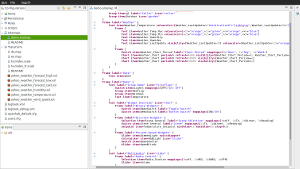
Creating a valid sitemap is perhaps openHAB's weakest point. Although, in theory, one could study the syntax of the demo sitemap and create a new one by hand, the preferred method for building a sitemap is to use openHAB Designer, which is an Eclipse plugin that is provided as a separate download from the openHAB site. openHAB Designer provides syntax highlighting, auto-completion, and other features, but little in the way of guidance or best practices. In practice, I found it considerably easier to just copy and paste snippets from the sitemaps shared on the mailing list or on various blog posts.
Naturally, it is an open question how much one should generalize from this experience (presumably, a familiarity with Xtext helps), but my guess is that if modifying a sitemap is a taxing process, users will tend to put it off or stop adding new devices. Expert installers may set up a home-automation deployment once, but hobbyists tend to tinker frequently.
The final piece of the configuration puzzle is defining any rules that govern automatic device behavior: from lights turning on at dusk to modules responding automatically whenever a motion sensor is triggered. As with sitemaps, openHAB has its own language for expressing rules—although it is not a complicated one.
Each rule must specify a set of one or more trigger conditions, then define an execution block that the openHAB server will run in response. Valid triggers can be events sent by modules on the openHAB bus, time-based events, or system events like startup and shutdown. The execution block can contain general-purpose Java code, which makes openHAB considerably more flexible than systems like OpenRemote, where the only actions available are sending commands to other modules.
Of course, this level of flexibility also means that users need to beware that insecure or buggy code in their rules can have disastrous effects on their system. The samples on the wiki include some cautionary comments about making HTTP requests and avoiding concurrency problems.
Welcome home
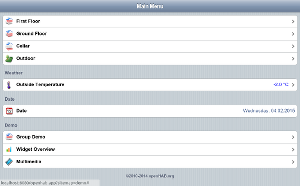
Once the configuration is complete, though, openHAB offers a lot control through its web and app interfaces. Basic manipulation of connected devices is easy, as one would expect, but openHAB's ability to embed status reports—for example, showing all open windows around the house—and graphs of sensor data (such as thermometer readings) sets it apart. My sole complaint about the web UI at this stage is that its visual look-and-feel seems designed to emulate iOS (and clearly an older iOS version, although it is hard to pin down exactly which one). There do appear to be several alternative web interfaces in development around the community, though, so perhaps all hope is not lost.
A week is hardly enough time to get to know a home-automation program. By its very nature, many of the features are only really put to the test once or twice a day. At this stage, though, openHAB's support for a wide array of hardware puts it ahead of several contemporary projects like Home Assistant and, as convoluted as openHAB sitemaps are to develop, they are still easier to work with than MisterHouse, which requires the user to write Perl functions for each device.
At the very least, openHAB offers home-automation enthusiasts the flexibility to customize their setups to match their precise needs. Moreover, the active development and user community is a boon to newcomers, as well as signifying that the project is one worth watching in the future.
New etcd, appc, and Rocket releases from CoreOS
CoreOS has become "the other Linux container startup", rivaling Docker Inc. in both advancing and controlling the specification for the rapidly evolving container-based deployment and cloud ecosystem. As part of promoting its platform and projects, CoreOS holds monthly Meetup events at Rackspace's Geekdom shared office in San Francisco. The CoreOS Meetup on January 27 turned into a release party for two CoreOS projects, etcd and the appc specification. CoreOS staff, project contributors, and a high-profile user explained what was in the new versions, as well as what each project was working on.
etcd 2.0
CoreOS CTO Brandon Philips started things off by announcing etcd 2.0, which was released on January 28. Version 2.0 includes multiple advancements, including backup and restore of the data stored in the cluster, substantial stability improvements, new configuration tools, and a bootstrapping mode for creating new clusters. As LWN explained in a previous article, etcd is a fault-tolerant, consistent, durable, distributed key-value store. CoreOS created etcd in to provide a shared configuration for a large server cluster.

Etcd 2.0 became a release candidate on December 18 and had over a month of testing. As this is the first "stable" version, project members were concerned that it be relatively bug-free and that the APIs be stable hereafter with minimal breakage.
After briefing attendees about how etcd works, Philips explained the jump in version numbers, since the previous released version of etcd was 0.4.6. The REST API for etcd, which is its primary interface, also carries a version number that was already version 2. CoreOS staff felt that it would be confusing for users to have an API version higher than the software version, so they skipped 1.0 completely.
The project is now two years old, and has received contributions from 140 people. As a project, etcd has been incorporated into many other products and projects, including Mailgun's vulcand load-balancer, the confd distributed configuration file tool, distributed Git servers, Google's Kubernetes orchestration manager, Apache Mesos, and Yodlr (see below).
The most user-visible new feature of etcd 2.0 is the new administration commands. First, "etcdctl backup" and "etcdctl restore" allows using files to backup and restore the data from a running etcd cluster cleanly and safely. Second, "etcdctl member" commands permit users to add and remove nodes from their etcd cluster without the need to change configuration files and restart the cluster.
The new version also implements a new "proxy mode" for etcd nodes. This allows users to add additional etcd servers that do not participate in consensus and failover, but instead just mirror the data available through the main nodes. This feature supports much larger etcd clusters with high read loads, such as when etcd is being used to support an infrastructure of hundreds or thousands of containers.
Less visible to users but even more important are the stability and data-integrity improvements. First, the project improved the Raft algorithm [PDF] implementation, which supports etcd server consensus and leader election, by borrowing some ideas from the CockroachDB project. The project also changed the way etcd's Write Ahead Log (WAL) is used, both to support backup, and to prevent certain kinds of data-corruption failures.
"Filesystems truncate and corrupt data," explained Philips. "We used to rewind the log, which would cause failures when the filesystem did something unexpected. We also added checksums to the log."
Because misconfiguration of a cluster is easy to do, the team added UUIDs to identify both individual nodes and the etcd cluster. This UUID is now used in every API request, in order to make sure that nodes don't attach to the wrong cluster or peer with the wrong node.
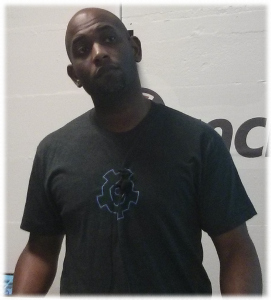
Kelsey Hightower, a contributor to etcd and a CoreOS staff member, then presented etcd's new bootstrapping features. Previously, one of the major problems was that an etcd cluster required at least two nodes to operate, but you couldn't configure etcd nodes to communicate until you had a cluster, creating a "catch-22". Version 2.0 implements a new "bootstrapping mode" that allows a new cluster to come up and establish peering.
This bootstrapping has three modes: static, DNS, and discovery-based. Static mode just uses command-line switches to tell each node what cluster to join. DNS mode uses SRV records from the DNS server to inform each etcd node of its initial cluster membership.
CoreOS's preferred mode is discovery-based, where each node is given an URL from which to obtain an initial token, and then peers with other nodes that have that token. The URL is that of a single-node etcd server, run just for the bootstrapping process. While users can run their own, CoreOS runs a public discovery key server at discovery.etcd.io in order to eliminate a step.
The etcd 2.0 launch finished with a brief presentation by Ross Kukulinski, founder of Yodlr, on using etcd to build a web application. Yodlr is a new live chat and voice collaboration tool that was created by the training team of a large company for its internal use. When customers became more interested in the chat tool than in the training, the team had to scale out the service quickly. Etcd was indispensable in coordinating user sessions across multiple servers.
The appc Standard and Rocket

Jonathan Boulle, a senior engineer at CoreOS, explained the App Container specification (appc). Both this specification, and the rkt or "Rocket" container runtime were released as version 0.2.0 on January 23. The appc team hopes that this means a stable version of the standard will be released next.
The purpose of appc is to create a universal standard for application containers, to allow them to be implemented in ways that are vendor-independent and OS-independent. Currently, the specification is supported by corporate partners Mesosphere and Pivotal, but most development and revisions are still written by the CoreOS staff.
This specification covers the four main components of how applications should be run in containers:
- Image Format: specifies the structure of the image file for the guest runtime environment. This is simply a tarball containing a root filesystem and a JSON-format manifest, as well as an image identifier.
- Image Discovery: specifies a federated namespace for image names, which use an URL-like structure.
- Executor: specifies how the runtime environment for applications works, including the handling of filesystem mounts and environment variables.
- Metadata: specifies how each executor and container offers metadata, including a container ID and Hash-based message authentication code (HMAC) key.
The new 0.2 release of the specification now includes discovery authentication for secure service discovery on shared networks. It also includes HMAC signature validation for containers, which has moved to the SHA512 algorithm in order to take advantage of processor acceleration.
Appc has also inspired a few non-CoreOS projects and implementations. One such is Jetpack, a FreeBSD application container executor created by a Polish team. There is also libappc, a C++ library for working with containers, and docker2aci, a tool for converting Docker images to appc format.
The primary implementation of appc remains rkt, or "Rocket", which is CoreOS's own container runtime, as previously covered in LWN. Rocket is the demonstration implementation of "stage 1" from the appc specification, including the container format and metadata.
The primary difference between Docker and Rocket from a user perspective
is that Docker runs as a system daemon that handles all container
management, while Rocket is implemented as a library standalone binary. The idea of Rocket is
a minimal implementation that makes use of the host OS's init system and
tools. In the CoreOS distribution, this means using systemd to manage
containers. Also, because Rocket is a library standalone program, it relies on file-based
locking rather than using a lock daemon.
Version 0.2 implements three new commands: "status" to get the status of running containers; "enter" to attach the terminal to a running container; and "gc" to perform garbage collection of dead containers. The new version also implements public key validation for trusted repository container images, which works in much the same way as the keys for Apt repositories on Debian.
Boulle also discussed and demonstrated what's currently in development for version 0.3.0. This includes an "rkt trust" command for easy key validation and improved support for group permissions and non-systemd init systems. Rocket 0.3 will also support secure image hosting via Quay.io, one of CoreOS's commercial services.
Having discussed the features, Boulle then went over some of the areas of Rocket and appc that still need work.
Rocket leverages systemd heavily, but has systemd from CoreOS bundled into the rkt binary because of varying OS-level support for systemd. While this makes Rocket easy to install currently, it causes serious problems with Linux packaging systems. Systemd needs to be decoupled, which will also make it possible to swap execution environments for Rocket.
Second, networking is still incomplete. Appc specifies a rule of "one IP address per container", but not how that IP address is to be obtained. Currently the team is working on a plugin-based system in order to support multiple ways of allocating IPs. This is part of the specification in active development.
The third major issue is that Rocket doesn't yet have any tools to build images. The plan is to have a tool, which is completely separate from the Rocket runtime, that builds images according to the appc specification. While there are several ways to create a root filesystem using Linux tools, most Rocket users create images by converting Docker images.
Conclusion
CoreOS, etcd, appc, and Rocket seem to have a strong development momentum, with rapid releases and a lot of new features and products. While the Docker/CoreOS split originally looked like it might be an iceberg in the path of Linux containerization, instead it seems to be driving intense innovation in more directions than could have been embraced by the Docker team itself. Regardless of the success of any of the individual projects, Linux users (as well as FreeBSD and illumos users) have new and rapidly evolving options for container-based deployment. No matter how it works out, it will be exciting to watch.
A look at Inkscape 0.91
The Inkscape project released version 0.91 at the end of January, a release culminating more than four years of development. The new release incorporates a lengthy list of improvements from that time period: new tools, performance enhancements, and fixes to several longstanding bugs. Just as importantly, though, it also lays the groundwork for a 1.0 release that will signify an important milestone: full SVG 1.1 support. Over the years, though, Inkscape has evolved to be more than just an SVG editor—as version 0.91 demonstrates.
What's in a number
For a bit of context, the last stable release of Inkscape was version 0.48, released in August of 2010. The follow-up release was initially supposed to be version 0.49, which we examined in late 2012. But that 0.49 release was pushed back multiple times and, in April of 2014, the project outlined a different release plan during Libre Graphics Meeting. The next stable release would be designated 0.91—a numeric bump intended to better reflect the maturity of the codebase—and the release after that would be Inkscape 1.0.
Applying the 1.0 moniker to a release is largely a public-relations issue; users unfamiliar with free-software projects may expect a pre-1.0 version number to mean that an application is unstable or unreliable—which is often not the case in the FOSS world (at least, within certain tolerances). But the 1.0 release will also signify that Inkscape has attained complete support of the SVG 1.1 specification (minus those portions of the specification that do not apply to a vector graphics editor, like interactivity).
As for the 0.91 release itself, it includes numerous updates and changes that have accumulated since 0.48, and it marks the completion of a major code-refactoring effort. Hopefully, with that work complete, the process of focusing on SVG-support features for 1.0 will proceed apace. But for anyone still using version 0.48, the improvements found in 0.91 constitute a serious upgrade in functionality.
Downloads are available from the project's web site for Linux and other operating systems. Binary packages are already available for openSUSE and Ubuntu, with other distributions said to be coming soon, in addition to source code bundles.
Drawing tools
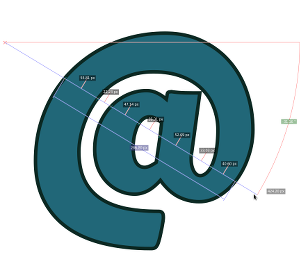
In our preview of 0.49, we discussed two entirely new tools that make their debut in the new release: an on-canvas measuring tool and the PowerStroke pen tool. Without rehashing the same explanations again, it is interesting to note that the two serve considerably different user groups.
With the measuring tool, a user can draw a line anywhere on the canvas and see the distances between every object that the line crosses. This is perhaps most useful for structured drawings where precision is of utmost importance. The PowerStroke pen, on the other hand, is an expressive instrument: users can use it to draw calligraphic strokes and shapes that change width and shape according to how much pressure is applied (if their input device is pressure-sensitive, that is).
Version 0.91 includes several other additions to the drawing features. A lot of the changes have to do with selecting and moving objects in a drawing—which gets increasingly important the more complex a drawing is. The "Align and Distribute" tool, for instance, is one of the most frequently used ways to manipulate on-canvas objects; it provides multiple ways to instantly line up or rearrange selected objects with respect to each other or to the page. In version 0.91, there are several new options, such as swapping the positions of two selected objects or rearranging the z-order stacking of selected objects.
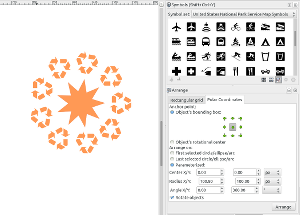
It is also now possible to arrange selected objects in radial fashion, rather than just in rows and columns. Users can also select all objects on the canvas that share a common property (such as foreground or background color). For both of those tasks, there were kludgy workarounds possible in the past, so eliminating the workarounds can be a significant time-saver. Similarly, there is now a "Clone original" feature that makes it easier to make multiple clones of an object. In the old approach, one would have to either hunt through the drawing trying to find the original among all of the clones (which is clearly difficult when dealing with clones), or else end up with some clones and some clones-of-clones (and clones-of-clones-of-clones, ad nauseam).
As was the case during the 0.49 era, the gradient tool has seen several improvements—the latest being a way to view a handy list of all of the gradients used in the current document. So, too, has the text tool. The text menu now shows all variants of the system's installed fonts (which is helpful when automatically created fake "bold" and "italic" text does not look right) and Inkscape will pop up a notification dialog listing all font substitutions it had to perform when opening the current document. Users can also get a list of all of the fonts used in a document and can select all objects using a particular font.
Last but not least, the "trace bitmap" tool now displays a live preview on the canvas as the user adjusts the settings. Live preview has been systematically rolled out to more and more features in Inkscape and, with some features, it can make all the difference in the world to see changes reflected instantly on the drawing as one adjusts sliders and checkboxes.
Interface polish
Apart from directly manipulating items on the canvas, there are a host of improvements to the general user interface. Guide lines can now be named (to help users keep them straight) and can be assigned colors (which is particularly useful when it is hard to remember which pairs of guides—like margins—are meant to go together). The control "handles" that are used to grab objects like path nodes with the mouse can now be resized, which will be a welcome change to users of high-DPI screens and touchscreens.
There are also a lot of existing features that are now accessible through the right-click menu. The list includes grouping and ungrouping objects, the fill/stroke editor, the spellchecker, and the text-and-font settings. It is tempting to say that users with large screens will benefit most from these additions by not having to scroll to the screen's edge, but in reality they are a convenience most people will enjoy.
The behavior of core dialog boxes has been polished, too. Almost all dialogs can be docked to the main window now, and all undocked dialogs remember their position and state between editing sessions. Some dialogs have even been combined (such as "Document properties" and "Document metadata").
Extensions and exports
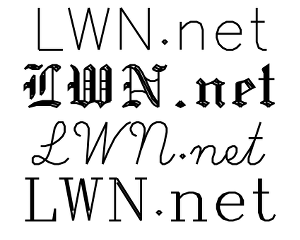
As always, the latest release includes a lot of new functionality available in extensions. Several new extensions work with text objects: "Extract text" dumps all of the text in a drawing to a separate file, "Merge text" combines selected text objects into a single object, and "Hershey text" transforms text objects into single-stroke text paths that can be drawn on a plotter or laser-cutting device.
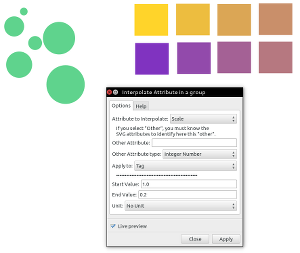
Other extensions add smaller but frequently requested features, like the ability to crop imported bitmap images or the ability to adjust colors using hue, saturation, and lightness (HSL) controls rather than the more traditional RGB values. An entirely new extension that many users may find useful is "Interpolate attribute in a group." It allows the user to select any number of objects, group them, then apply a smooth interpolation of several attributes (color, width, height, opacity, etc.) across the group. As is common to several of the new features, this could be done manually in earlier releases, but it was time-consuming and often painful to get right.
The final set of new features worth exploring all relate to generating output from an Inkscape document. Inkscape's native format is a superset of strict SVG, so users who need to export W3C-compatible SVG will be happy to hear that there is now an SVG sanity-checker built-in. PDF export now contains bleed and margin options, which simplifies production of print-ready output (and again echoes the recurring theme of building in a function that users had previously needed to perform manually). Documents can also now be saved as HTML5 <canvas> objects, which is a new feature.
Free-software users may be most pleased to learn that export to GIMP's .XCF format has received a significant upgrade in Inkscape 0.91. XCF files can now be exported at a user-defined resolution, the exported file will now preserve the names of all of the layers in the Inkscape document, and there is an option to toggle whether or not the background layer is saved to the XCF. The latter function is perhaps most useful when prototyping: a dummy background or page color may be necessary to visualize the design, but is not part of the desired output.
Under the radar
The number of new features and enhancements that can accumulate over the course of four years is enormous—even more so for Inkscape, given its robust extension system. The changes described above are by no means a comprehensive list; those needing such a list will want to read the release notes, and perhaps revisit our 2012 preview of the canceled 0.49 release.
But apart from all of the user-visible functionality in Inkscape 0.91, the long release cycle also allowed the team to undertake some behind-the-scenes improvements. The rendering speed has increased considerably thanks to that work: the on-screen rendering and PNG export were ported to Cairo and rendered objects are now cached. Applying filters is now faster, thanks to the use of OpenMP, and memory usage has been reduced (the 0.91 release notes say the reduction could be up to a factor of four, depending on the document).
Other improvements to the codebase were in the code-cleanup category: not user-visible, but helpful for developers. The project finally completed transitioning to C++, and refactored the style-handling code. The team has also begun working on automating its build processes and adding a test suite—both changes that, like code cleanup, should reap rewards in subsequent releases. And those subsequent releases are already under development: users can track the progress of the next version (which, at least for now, is designated 0.92) at the Inkscape wiki.
Although the lengthy development cycle that led up to the 0.91 release resulted in a plethora of new tools and features, the time span itself has a downside: projects that release too slowly can frustrate users or even give the appearance of being dormant. Inkscape 0.91 clearly dispels that notion. Nevertheless, project members have made it known in interviews that they hope to return to a shorter development cycle now, approaching the long-awaited (but hopefully not too distant) 1.0 release. In the meantime, though, there is a wide array of new functionality for users to explore.
Page editor: Jonathan Corbet
Inside this week's LWN.net Weekly Edition
- Security: Fedora and "strong" passwords; New vulnerabilities in java, krb5, patch, vlc, ...
- Kernel: Linux as a single-user system; 3.19 development statistics; How ELF binaries are run.
- Distributions: FreeNAS — network-attached storage with ZFS; Calamares, Guix, openSUSE, UBOS, ...
- Development: Plotting with matplotlib; LibreOffice 4.4; LXC 1.1; Plasma 5.2; ...
- Announcements: OPW becomes Outreachy, Libreboot X200 laptop, fixmydocuments.eu, ...