

Development
Sync things with Syncthing
Synchronizing files between multiple machines is a target of perpetual development effort; for every combination of features (cloud-based versus non-, automatic versus manual, peer-to-peer versus star-topology, etc.) there is at least one free-software project optimizing for that specific usage scenario. In that sense, Syncthing is merely one synchronization option among many. But the project, which is nearing its 1.0 release, offers several features that are likely to be of interest: simple configuration, decentralized operation, and a focus on security.
At its fundamental level, Syncthing is a peer-to-peer file synchronization system. Users can connect an arbitrary number of nodes (that is, machines) in a set to keep synchronized, and can set up multiple directories on each node to synchronize. They can even synchronize different directories between different combinations of nodes. All communication is secured over TLS/SSL, with a unique certificate for each node, and nodes can discover and authenticate each other even if they use dynamic IP addresses. The default interface is a simple-to-use web application, but there is also an unofficial Android app (developed outside the project) available.
Syncthing is MIT-licensed, and the source code is hosted at GitHub. The latest release is version 0.9.19, from September 30. Binary builds are provided for 32-bit and 64-bit Linux and FreeBSD on x86, for Linux on ARMv5, ARMv6, and ARMv7, and for Windows and Mac OS X. The unofficial Android app is available both from Google's Play Store and from the free-software repository F-Droid.
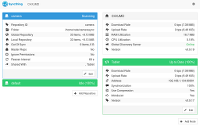
The main (that is, non-Android) Syncthing application is written in Go, and needs to be run on each machine that the user wishes to synchronize. When started up, the application opens a local web server on port 8080 to provide the web user interface. The first time Syncthing is run on a particular machine, it generates an RSA key and an SSL certificate. The certificate's fingerprint is used as the node ID for the local machine; to synchronize a pair of machines, the user must open the "add node" dialog on each machine and enter the device ID of the other node. Since these fingerprints are lengthy alphanumeric strings, the UI also generates a QR code that can be captured with a camera to make sharing IDs somewhat less painful. In any case, node IDs are not secrets, but they must be exchanged out-of-band in some fashion.
Nevertheless, when each Syncthing node starts up, it announces its node ID both on the local network (via the Simple Service Discovery Protocol (SSDP) from Universal Plug-and-Play) and, optionally, by sending a message to the Syncthing Global Discovery Server running at announce.syncthing.net:22026. Other high-numbered ports are used for the nodes to send their announcements to the global server; for any given pair of nodes, this means that at least one of the nodes must be able to reach the server (through any firewalls or NAT) in order to connect the pair. Since both nodes must agree to a synchronization pairing, though, the project documentation says that a remote attacker cannot simply listen for announcements and hijack a sync. Alternatively, if static IP addresses are available for all nodes, users can skip contacting the global discovery server altogether.
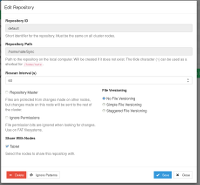
The system also provides security against eavesdropping by requiring all traffic to be sent over TLS/SSL—specifically, TLS version 1.2 or later, with a cipher suite supporting perfect forward secrecy. The messaging protocol is documented in the project's GitHub repository. For a directory that is synchronized between machines, file content and modification times are always synchronized, file permissions are synchronized whenever the filesystem in use supports them (i.e., not on Windows), but other file metadata (such as owners and groups or extended attributes) are not synchronized. Since the Syncthing process is unprivileged, the files will simply be owned by the user running Syncthing. Optionally, users can specify whether or not to track old versions of the files in each directory, and can specify one node to be the "master" for each directory—meaning that it will ignore changes from other nodes.
All of this is essentially standard-issue for a synchronization framework; the bigger question is whether or not it works. On that front, Syncthing 0.9 already scores quite well. The web interface, for the most part, keeps out of the way, and it is fairly easy to add new directories for synchronization and to navigate the various options. In fact, when I tested Syncthing between a Debian machine and an Android tablet, the most difficult part of the process was finding the Android device's node ID—to type laboriously into the desktop node's "new node" dialog.
Of course, I tested only a small set of nodes with a small set of directories. It is always possible that the simple and responsive web UI begins to bog down when a large library of directories and nodes need to be tracked. By default, the Syncthing application will send a status message to its peers once every 60 seconds in order to look for changes. Luckily, this value is configurable, so anyone dealing with a large set of rapidly changing files may not be too inconvenienced. The web UI also does a good job reporting the load and disk usage for the local node, so hopefully if one is overworked, it will not be too difficult to discover.
Syncthing does manage to make node setup easier than a lot of free-software sync frameworks do. The details are what matter here. For example, in the web UI, the configuration dialog for each directory is automatically populated with the names of the other nodes; adding a new node to the sync pool for a particular directory is as simple as clicking a checkbox. Perhaps the only frustrating part of Syncthing configuration is dealing with the fact that the Syncthing server needs to be restarted after every major configuration change—such as adding a new node. Restarts can be done through the web UI and Android app, but it does get old after a while.
There are a wide variety of server-based file synchronization frameworks available as free software these days. Most attempt to emulate the Dropbox model, where a remote server acts as the master storage repository and all of the other machines act as clients. While this topology makes accessing the server simpler, it has the inherent risk factor of depending on the availability of the server at all times—not to mention the risk that some attacker will compromise the remote server. In that sense, Syncthing's peer-to-peer design will probably appeal to a lot of security-conscious users.
The application is probably closer to BitTorrent Sync than to Dropbox in its functionality—except that all of the source code is freely available. Perhaps a more rigorous security audit of Syncthing would be advisable for those with stringent security requirements, but even at its current, pre-1.0 status, the project is doing a lot of things right, which makes it a project well worth following.
Brief items
Quotes of the week
And perhaps all of these thoughts were triggered by the BASH bug which I keep hearing about on the news in very vague terms, and in quite specific discussion in IRC and mail lists. Old, stable code can yield new, interesting bugs! Maybe even dangerous vulnerabilities. So it's always worth raking over old ground, to see what comes to the surface.
PyDev 3.8.0 available
Version 3.8.0 of the PyDev Python IDE has been released. Among other changes, this update includes the ability to attach the debugger to a running process. 3.8.0 also updates PyDev's dependencies to Eclipse 3.8 or 4.3 (and above) and Java 7.
gcc-python-plugin 0.13 released
Version 0.13 of gcc-python-plugin, which embeds the CPython
interpreter into GCC, has been released. Highlighted changes include
"a major revamping
" of the HTML output and support for
GCC 4.9.
Newsletters and articles
Development newsletters from the past week
- What's cooking in git.git (September 24)
- What's cooking in git.git (September 29)
- What's cooking in git.git (September 30)
- GNU Toolchain Update (September 29)
- Haskell Weekly News (September 24)
- LLVM Weekly (September 29)
- OCaml Weekly News (September 30)
- OpenStack Community Weekly Newsletter (September 26)
- Perl Weekly (September 29)
- PostgreSQL Weekly News (September 28)
- Python Weekly (September 25)
- Ruby Weekly (September 25)
- Tor Weekly News (October 1)
- Wikimedia Tech News (September 29)
Mahinovs: Distributing third party applications via Docker?
On his blog, Aigars Mahinovs considers an alternative to Lennart Poettering's recent thoughts about how Linux systems should be constructed. Mahinovs advocates a Docker-based approach. "Third party application developer writes a new game for Linux. As his target he chooses one of the "application runtime" Docker images on Docker Hub. Let's say he chooses the latest Debian stable release. In that case he writes a simple Dockerfile that installs his build-dependencies and compiles his game in "debian-app-dev:wheezy" container. The output of that is a new folder containing all the compiled game resources and another Dockerfile - this one describes the runtime dependencies of the game. Now when a docker image is built from this compiled folder, it is based on "debian-app:wheezy" container that no longer has any development tools and is optimized for speed and size. After this build is complete the developer exports the Docker image into a file. This file can contain either the full system needed to run the new game or (after #8214 is implemented) just the filesystem layers with the actual game files and enough meta-data to reconstruct the full environment from public Docker repos. The developer can then distribute this file to the end user in the way that is comfortable for them."
Python 3: threat or menace? (O'Reilly)
Here's an O'Reilly Radar article with suggestions on how to move to Python 3. "Python 3 isn’t a radical change (except for Unicode handling, which we’ll get to shortly). The visible changes are fairly small. It still has that minty Python scent, that art house whitespace framing, and that lovely, readable syntax. Python has always been — and this is not faint praise — a nice language. 3 is just a bit nicer. The developers chipped away at the technical debt that every project accumulates: using more consistent naming and behavior, dropping obsolete pieces, and of course fixing many bugs."
LibreSSL: More Than 30 Days Later
Ted Unangst has posted an update on LibreSSL development. "Joel and I have been working on a replacement API for OpenSSL, appropriately entitled ressl. Reimagined SSL is how I think of it. Our goals are consistency and simplicity. In particular, we answer the question 'What would the user like to do?' and not 'What does the TLS protocol allow the user to do?'. You can make a secure connection to a server. You can host a secure server. You can read and write some data over that connection."
Lightworks 12 gets better asset management, improves interoperability (Libre Graphics World)
Libre Graphics World (LGW) is running a look at the recently released
version 12.0 of the Lightworks
nonlinear video editor. "A
quick look suggests that the titler has been returned to the free
version, but exporting is still limited to H.264/MPEG-4 with 240p,
360p, 480p, and 720p options. One other source of income that the
company initially named was a marketplace for 3rd party plugins. After
a few years the idea looked generally forgotten or, at least, put
aside.
" We took at look at the first Linux release,
11.5, in February. The latest update
is noteworthy for being the first to support Linux, Windows, and Mac
OS X, which manufacturer EditShare has long maintained would be
the milestone required to release the application under open-source
terms. In addition to reviewing this update, LGW also spoke to the company
about its ever-changing plans for an open-source release.
Hyde: What's Wrong with Markdown
At his blog, Adam Hyde of FLOSS Manuals and BookSprints has written
a scathing critique
of the Markdown text-markup format—or, more particularly, of
users and tools that treat it as an HTML generator. "The
original purpose of .MD is that it can be read without converting it
to another format like HTML. Presumably John Gruber wanted a format
that could be read easily by the eye, allowing the user to be able to
quickly understand which part of a text is a heading, which part is a
list, which part is a paragraph etc. MD is designed not to be rendered
for display, it is meant to be the display.
" After looking at
some formatting examples, Hyde also takes aim at Markdown's claim of
being useful for "structured" text: "But what is structured
text? Structured text means basically that we can see if something is
a heading or something is a bullet list, or something is a
paragraph. Huh? But that describes just about any way you use to
create text documents. Structured text is the basic requirement of any
text you create....
"
Page editor: Nathan Willis
Next page:
Announcements>>