

Plasma 5: Evolving the KDE desktop
On July 15, KDE announced the 5.0 release of the Plasma desktop environment. The new version appears to be a refresh of Plasma to keep pace with current design and computing trends, including "flatness" (i.e., avoiding 3D decorations), high-DPI displays, and mobile devices.
I tested Plasma 5 in VirtualBox using the Project Neon ISO, which is based on Ubuntu 14.04 and, as one other reviewer had noted [YouTube], it's "put together by people who know what they're doing". Plasma 5.0 reveals much to like after extended use, but with a caveat. As the announcement mentions, the 5.0 release represents a project that still has a number of bugs to squash and features to add.
New visible features include: new
high-contrast icons for the desktop that are part of the Breeze theme, which
replaced Oxygen from Plasma 4 as default theme pack; an extendable,
"converged shell" that allows different user interfaces (UIs) depending on
the device it is running on; and increased support for
resolution-independence, which allows for "better usability and display on
screens with very small pixels, such as Retina displays
". The
Plasma 5 announcement gives some more details on the converged shell,
saying that it "lays the base for a converged user experience
bringing up a suitable UI for a given target device. User experiences can
be switched dynamically at runtime, [for example] based on hardware events
such as plugging in a keyboard and a mouse
".
KDE also said that Plasma 5.0 is less demanding of the hardware it runs on:
Unfortunately, I was not able to test some of these features in VirtualBox. Performance improvements can't reasonably be determined through a virtual machine; I was unable to run it on "bare metal" for this review. I was also unable to test the "converged shell", since shells for other devices (e.g., tablets and media centers) are still under development.
Frameworks
For developers, KDE Frameworks 5, which are the foundational libraries
supporting Plasma 5, provide some interesting new features. Released
at the beginning of July, Frameworks 5 marks a major step for KDE, as it is
trying to position its libraries as a platform-independent solution for
developers of
Qt-based applications. That
is, developers working with Qt can hook into Frameworks 5 libraries to
easily provide functionality "to simplify, accelerate and reduce the cost
of Qt development
". For example, instead of having to code a file
compressor and decompressor, Qt developers can use KArchive. Another
library, Sonnet,
lets developers easily plug in spell-checking software for their
applications.
This is nice timing for KDE, as it can capitalize on Qt's recent popularity for cross-platform development. Boasting more than 50 libraries, the extensively documented APIs offer lots of tools for different developer needs. The KDE project divided the libraries into four "tiers", largely based on how complex the libraries are. Tier 1 libraries, like KArchive and Sonnet, are all cross-platform and have few dependencies, while Tier 2 libraries (such as KUnitConversion, for converting between various unit systems) and Tier 3 libraries (such as KDESu, that developers can use to handle asking for passwords among other things) depend on the lower tiers. Almost all of the Frameworks 5 libraries can run on Mac OS X and Windows as well as Linux.
Look and feel
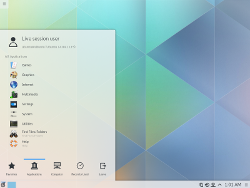
If we step away from the code and look at the desktop environment as an end user, an initial glance makes Plasma 5 look familiar, but modernized. Plasma 4 users should feel, largely, right at home, although they may miss some of the configuration depth that Plasma 4 is famous for. Influences of the recent trend toward "flatness" in user interface design — designing GUI elements to make them look two-dimensional, by avoiding decorations such as 3D borders and drop shadows — abound, such as the new look of the application launcher (seen at right).
The new high-contrast icon set is also in tune with the "flatter" look-and-feel of Plasma 5. However, there remain some 3D elements that jar with the increased flatness, including neon blue drop shadows behind windows. In addition, the minimize, maximize, and close buttons look 3D, so there was still some inconsistency there. The YouTube reviewer linked above did not see these problems; perhaps this particular ISO snapshot had some unintentional regressions.
Reflecting another popular trend, there are two visible instances of a "three parallel horizontal lines button", an increasingly widespread icon design that usually refers to a menu. One can be found in the top left corner, which allows various settings to be tweaked, and another in the bottom right corner as part of the panel; "the infamous Cashew of KDE" is gone.
Configuration options, which KDE is known for, are also to be found in Plasma 5, albeit in a more limited state now, as the project is still in development. I was not able to configure the window manager to use a "desktop cube" to navigate through workspaces, nor was I able to make windows wobble, features that one could set for Plasma 4.
When
playing around with the configuration options available, one may encounter
several bugs. For instance, none of my changes for desktop effects in
system settings worked. KDE was also unable to find the
providers.xml file for downloading more desktop effects. As the
Plasma 5.0 announcement noted, "many of [these features are] planned to
return with a subsequent release
", so users can expect later iterations
to implement some of these desktop effects.
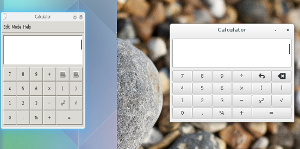
Some GTK+ and GNOME apps don't seem to play nicely with Plasma 5. For example, gnome-calculator had no icons for the undo and delete buttons (seen at right). Firefox looked and felt native, though, so this is not an issue with all GTK+ applications. There are also some other bugs — inevitable for a developmental ISO snapshot — that limited my ability to test the system fully. Muon Discover, the relatively new apt-get frontend for downloading software, can't be downloaded due to broken dependencies; the included Muon Package Manager works, but is less visually pleasing, since it looks more like Synaptic Package Manager than a polished "app store". Many packages were also unavailable to download, likely due to broken dependencies.
Those seeking to try out Plasma 5 outside the Project Neon ISO may encounter some difficulties. I first tried to run Plasma 5 by using the latest weekly snapshot for Kubuntu 14.04 in VirtualBox. I encountered some showstopper bugs there, including a bottom panel that disappeared completely when setting it to auto-hide. I then tried testing out the desktop on Fedora 20 using an unofficial repo, which refused to launch. The Project Neon ISO worked fine, though.
There's lots to look forward to for those following Plasma 5. Frameworks 5 will have new point releases every month this year. Plasma 5.0 will be focusing largely on squashing bugs, with a 5.1 release set for mid-October 2014. Development is lively; on August 12, KDE announced a 5.0.1 release that fixes bugs and adds translations.
Those still
wanting to stick with Plasma 4 have no need to worry; the 4.14
Release Schedule shows that the KDE project is still planning to
develop Plasma 4. Nonetheless, Plasma 5, the next generation of the KDE
Plasma desktop, brings a fresh, modern look to the Linux desktop; it
reflects some of the recent UI development trends in the desktop and mobile
world, while still seeming, through and through, like a project made by the
KDE team. I look forward to watching this desktop develop in the months to
come.
| Index entries for this article | |
|---|---|
| GuestArticles | Saunders, Adam |
The LWN site is currently under high scraper load, so comment display has been suppressed for anonymous users. If you are a human, you may read the comments by clicking the button below:
Note: you can avoid this step in the future by logging into your LWN account.