

Prototyping with Pencil (the other one)
Earlier this year I was reminded of one of the peculiar joys of free software: the fact that (trademarks aside) anyone can name a project anything they like, even if that project name is already in use. Specifically, when comparing the various parallel forks of the Pencil cell-animation application in June, there were numerous false-positive search engine hits caused by Pencil, the entirely unrelated open source application for making graphical user interface mock-ups. The mock-up tool recently made a new release, so a fresh look at it seems in order.
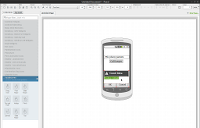
This "Pencil" is a visual prototyping system. Users can draw simple interface elements onto mock-up screens like one might do with a generic drawing application such as Inkscape, but Pencil goes a few steps further. First, the application ships with several loadable collections of UI elements taken from existing operating systems and platforms. These "stencil" collections (as they are called) include GTK+, Android, iOS, and an assortment of web application frameworks, plus several generic options. Second, Pencil supports linking multiple mock-ups through clickable UI elements, so it is possible to create simple interactive mock-ups rather than mere static images. Finally, the application can export its mock-ups to some interesting output formats, such as linked web pages (again, helpful when creating interactive prototypes).
Version 2.0.5 was released in late September, following on from 2.0.3 in June. Both introduced new features, after a considerable gap since the previous update in 2012. Pencil is based on Mozilla's XUL runtime, and it can be downloaded as a standalone application or installed as a Firefox extension. Linux builds of the standalone version are provided as Ubuntu and Fedora packages as well as a tarball. The Firefox extension is provided only on the project's downloads page—and is not available through Mozilla's official Add-ons site—which prompts Firefox to display a big scary warning about installing software from unknown sources when one tries to install it.
It is not easy to say which installation option is better; Pencil is a heavyweight among add-ons and I consistently found it to run slower than the standalone version (and to slow down web browsing). On the other hand, the installable packages will conflict with the "Pencil" animation application, since both want to install /usr/bin/pencil. It seems like a little package polishing should enable peaceful coexistence, but thus far neither project seems interested in renaming its own binary.
When launched, the Pencil interface sports a large drawing canvas and a collapsible tree-view palette showing all of the installed UI element stencils. Adding elements to the drawing is a simple drag-and-drop; most elements are an image with optional text fields overlaid on top. That means nothing (other than common sense) prevents the user from mixing iOS, GTK, Windows, and web elements on a single drawing. The text fields are editable with a double click, so that the user can apply appropriate labels and text-entry content.
At this level of editing, creating a mock-up is trivial—or, perhaps, the mechanics of creating the mock-up are trivial, while proper UI design remains the real challenge. But what makes Pencil more useful than a collection of clip-art images is how it bakes in features to automatically guide the user in the right direction, and how it hides its more complex functionality while still making it available when needed.
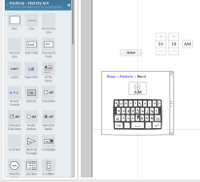
For example, all UI elements have handles at the four corners of their bounding box, plus at the horizontal and vertical midpoints. Whenever an element is being dragged, as its midpoint nears the midpoint of something beneath it, a guide line appears and the user can snap the element to the guide to automatically center it. Nothing looks worse than a UI where things are slightly misaligned, after all. The same feature is available to snap elements to the top, bottom, or sides of other elements. And the snap function is smart enough to align items to the "active" area of the element underneath. This means that elements will snap to alignment with the screen of the "phone" mock-ups, rather than to the outside edge of the device.
For comparison, while Inkscape offers a slew of alignment and spacing tools, Pencil makes it difficult to not line things up correctly. Similarly, Pencil elements can be resized without distortion by grabbing one of the handles and dragging. In Inkscape dragging a handle scales the entire object (including changing the width of the lines), leaving it distorted. Pencil only scales the empty space inside the element, leaving its lines un-mangled. There are ways around that problem in Inkscape, but Pencil builds the feature into the structure of the UI elements itself.
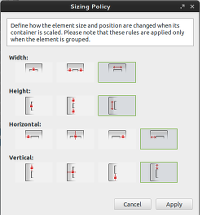
At the same time, each element has a number of editable properties that can be changed from the right-click menu. Changing text labels is the most common operation, so that is the double-click behavior, but the rest can be altered if necessary. These properties include basics like color and font settings, but they include more complex options, too. For instance, UI elements can be grouped together, and each element in the group can have a different "sizing policy" that controls what happens when the entire group is resized. That lets users create things like relative-width web page designs, where some fields (like menus) stay the same size when the page is resized, but others (like text blocks) expand to fill the available space.
Although most UI elements are image-based, some offer more involved features and generally provide advanced functionality. The "Placeholder Text" stencil offers lorem ipsum text blocks (and its properties include adjustable margins), scrollbar elements can be scrolled up or down, and so on. It is a bit of work to build an interactive prototype, since each variation of the UI (button unpressed, button pressed, etc.) needs to be created as a separate canvas image, but Pencil saves some duplication of effort by letting the user make a copy of the current canvas rather than starting from scratch.
Pencil is certainly not free from problems. Sometimes when dragging an element from the element palette, the element disappears when the cursor reaches the canvas. There also does not appear to be a list view of elements on the canvas, so if one is hidden by another, it is impossible to select it. Probably the biggest practical limitation is the freshness of the stencil sets, however. The GTK+ collection, for example, is clearly a GTK2-era design, and there does not seem to be any urgency to update it. There seems to be no Qt collection at all, nor (ironically) a Firefox/Thunderbird collection. Admittedly, the collection that is the most fun to use is the "Sketchy" set that looks like genuine drawn-on-the-back-of-a-napkin mock-ups, but updates to the collections for Linux and web platforms that make them as current as the Android and iOS offerings would be nice.
Most of the professional UI and UX designers in the free software
world seem to have gotten comfortable creating mock-ups in Gimp,
Inkscape, and even Blender, so retraining on a different application
may not sound appealing. Novices, however, will probably find Pencil
easier to learn than a general-purpose drawing application. But it is
possible that Pencil offers something worthwhile to interaction
designers, too, and they may not be aware of it—after all, there
are plenty of other Pencils available to choose from.
The LWN site is currently under high scraper load, so comment display has been suppressed for anonymous users. If you are a human, you may read the comments by clicking the button below:
Note: you can avoid this step in the future by logging into your LWN account.