

LWN.net Weekly Edition for November 7, 2013
Automotive networking
The Automotive Linux Summit in Edinburgh featured a variety of talks that addressed in-car networking. While there are obviously a lot of overlapping requirements between automotive computers and other hardware platforms, the car has its own peculiarities that Linux developers must contend with—from vehicle-specific layers that predate the adoption of Linux by carmakers, to wireless use cases not found in office environments and smartphones. Of course, networking cars also opens up the possibility of car-to-car communication and (further down the line) cars that can exchange data with stationary nodes that make up the highway infrastructure itself.
The maturity of Linux support for each of these categories varies; in-vehicle infotainment (IVI) head units bear the closest resemblance to off-the-shelf PCs so, as one might expect, in-cabin networking with familiar technology like Bluetooth is in good shape. Using Linux for embedded engine control units (ECUs) under the hood is a bit less mature, but the essential elements are all in place. Car-to-car and car-to-infrastructure networking is still a developing concept for everyone so, although Linux-based solutions in this area are not yet mature, no other operating system is in a particularly better state.
CAN you dig it
Controller Area Network (CAN) bus is the physical-layer network protocol used to connect the majority of ECUs in modern automobiles. Marc Kleine-Budde of Pengutronix delivered a session on SocketCAN, the official CAN bus API of the kernel. As the name suggests, SocketCAN implements CAN bus access as a standard POSIX internet socket, which makes writing CAN support for a program little different from writing Ethernet support. There are certainly differences in the specifics, of course, starting with CAN bus's significantly smaller frames. Kleine-Budde described the situation as "eight data bytes, and the rest is details that you don't want to care about if you're writing an application." The latest revision to CAN bus ups the frame size to 64 bytes, but the point is essentially unchanged. Much like Ethernet, CAN bus is datagram-oriented and uses broadcast transmission on the wire.

Not that long ago, he said, the situation was not nearly as rosy. Before SocketCAN, everyone said "CAN is so simple, let's just treat it like a serial port." The result of that approach was that every company wrote its own character-based device driver for its CAN hardware, none of them were interoperable thanks to varying interpretations of the standard, and—worst of all—only one application could use the CAN bus at a time. Applications were also left on their own to implement higher-level protocols or to filter incoming CAN traffic, and changing CAN adapters meant rewriting the application.
The SocketCAN project set out to solve all of these problems by using the same model used by the kernel's Ethernet code: device drivers for specific hardware, unified at the protocol layer. Multiple buses needed to be supported, with potentially multiple applications running as multiple users. As a result, the project created a new protocol family, PF_CAN, analogous to PF_INET IP sockets. PF_CAN connects to the Linux socket layer above, and uses plugins to support different CAN protocols—although he spoke primarily about the CAN_RAW plugin, which is used for sending out raw CAN frames.
There is a receive dispatcher to implement filtering; an incoming CAN frame is dispatched to all CAN protocols that match the filter. Applications can register with specific CAN adapters, or they can register for messages from specific CAN addresses.
One significant distinction from PF_INET is that outgoing CAN packets are also looped back into the receive queue; this is so that CAN applications running on the same system will be able to communicate. Since the expectation is that an automotive Linux system will have many CAN applications that are ported from embedded Linux devices, this loopback should be a useful migration tool. He also said that the SocketCAN project had to invent can_err error frames, which did not exist in CAN bus itself but were necessary for routing.
The advantages of the SocketCAN approach are that CAN device drivers can replicate much of the same model used for Ethernet drivers, application developers can use the POSIX socket API which has been around for 30 years, and PF_CAN can reuse clearly-defined kernel interfaces. But there are some caveats, Kleine-Budde said. First, the overhead of CAN bus is significantly higher than Ethernet's, due to the small frame size. Second, because the Linux packet scheduler is a shared resource among all network devices, heavy Ethernet traffic can potentially delay CAN traffic.
Kleine-Budde then gave some brief code examples showing how to open a CAN socket and push bytes out in a frame. The code has been in the upstream kernel for about five years, he said, but embedded developers should note that the tools are not yet available for Busybox. More features are still in development, starting with additional CAN protocols like the broadcast manager (BCM), which is used for handling "cyclic" messages that other CAN devices expect to see re-broadcast periodically, a CAN gateway protocol for routing between segments, the CAN-based transport protocol ISO-TP, and the SAE J1939 diagnostic protocol.
Short range
While CAN bus is used by the controllers that connect a car's physical systems to the network, more familiar networking mechanisms are found within the cabin—such as Bluetooth and Near-Field Communication (NFC). But automotive computing tends to bring out different use cases for both technologies than do laptops, tablets, and phones.
Samuel Ortiz discussed the work he has been doing on NFC support. While NFC is becoming commonplace in smartphones, in that form-factor it is largely used for a specific set of tasks, such as mobile payments and exchanging digital business cards. Ortiz gave an overview of Linux NFC support, then discussed two automotive use cases: NFC connection handover and keyless entry.
NFC connection handover is a wireless device pairing method in which touching the two devices (such as a smartphone and a vehicle head unit) replaces PIN entry or other authentication methods to establish a Bluetooth or WiFi connection. Support for connection handover in the Linux NFC stack is quite good, both for handovers initiated by the smartphone and by the head unit.
Keyless entry is a little more complicated, although largely for legal rather than technical reasons. The process is straightforward enough: the NFC-enabled device replaces a physical key; the door lock includes an NFC reader that unlocks the door when it verifies that the device is authorized. The complicating factor is that contactless key systems rely on the presence of a "secure element" in the device, one that includes both a tamper-resistant storage area and a java applet that runs in a trusted execution environment.
These security requirements are much the same as those for mobile NFC payment systems, he said, in which the device must be "provisioned" (that is, have its secure element installed) by a trusted supplier. The major credit card companies only trust three or four suppliers worldwide, he said; the situation for vehicle manufacturers will likely be similar. Linux NFC supports the secure element authentication scheme, although it remains to be seen how car manufacturers will implement it—and thus how secure element hardware will be provisioned.
João Paulo Rechi Vita spoke about the Linux Bluetooth stack's role in IVI—namely, support for the Hands-Free Profile (HFP) and for AVRCP+A2DP (Audio/Video Remote Control Profile with Advanced Audio Distribution Profile). HFP allows the user to make phone calls using the car's speakers and microphones for audio, and AVRCP+A2DP enables streaming media from a handset or Bluetooth-enabled tablet to the vehicle's audio player. AVRCP implements three main features: media player commands (play, pause, skip, etc.), sending media metadata (such as track titles and artists), and browsing the media on a device. A2DP supports sending 2 compressed audio channels over Bluetooth (one-way only, unlike HFP), with several possible codecs.
Support for these Bluetooth protocols was rewritten for BlueZ 5.5, and has also resulted in patches for PulseAudio and oFono. oFono also supports the dial-up networking (DUN) Bluetooth profile, which is not specific to automotive, but is useful nonetheless.
Calling all cars
Alison Chaiken spoke about the emerging development of vehicle-to-vehicle (V2V) and vehicle-to-infrastructure (V2I) networking. V2V and V2I (or, collectively, V2X) networking is frequently discussed in highway safety terms, such as cooperative cruise control that lets cars travel at the optimal speed while keeping them the correct distance from the cars around them. But it has plenty of other use cases, from relaying traffic and weather information for approaching vehicles to emergency services and virtual signage.
Networking for V2V and V2I is focused on IEEE 802.11p, also known in Europe as ITS-G5 (meaning Intelligent Transportation System, in the 5GHz band). As with the other 802.11 flavors, 802.11p is a "physical-layer" standard, although 802.11p is designed to be extremely low-latency, which was deemed a critical factor for preventing collisions. The main collision-avoidance scenarios are forward crash warnings (FCW) and lane-change warnings (LCW), both of which are applications of V2V. Nevertheless, LTE cellular networks and existing satellite/terrestrial radio are also expected to play a major role in vehicular networking, but for other purposes, so 802.11p will coexist with—rather than replace—other networking standards.
802.11p has low message overhead, and is always run in ad-hoc network mode—that is, there are no access points to connect to; all 802.11p devices use a wildcard BSSID. Furthermore, 802.11p has no basic service set (BSS), which eliminates much of the delay of establishing a link. That, of course, is useful when one vehicle may only be in range of another (or of a roadside station) for a matter of seconds. Connections use half-width 802.11 channels, and transmitters are restricted to specific power limits by regulation.
For now, though, there is no upstream Linux driver for 802.11p hardware, even though there are more than a dozen companies manufacturing 802.11p radios. The chipsets used come from the usual suspects: Atheros, Ralink, and NXP, but the devices for sale are embedded Linux routers designed to be used with bundled proprietary software from another machine, as opposed to (for example) commodity network cards that could be used in an existing PC. As one might guess, these products are not marketed for mass consumption and tend to be very expensive. Nevertheless, Chaiken said, there is some open source software for 802.11p, such as Componentality's FlexRoad, which is built on top of OpenWRT and (unlike the competition) includes open source firmware.
Deploying V2X networking will require cooperation from OEMs and from governments, of course. There have been two recent field trials of note: one in Ann Arbor Michigan, and one in Germany. The trial in Germany tested V2I, while the Michigan trial tested V2V. The US National Highway Traffic Safety Administration (NHTSA) is expected to release a proposal based on the results of the Michigan trial by the end of 2013. In both cases, Chaiken noted, the safety-critical V2X software stack ran over its own network-layer protocol, rather than IP.
While the industry waits for regulatory progress, the engineering community continues to work on other portions of the V2X stack; the IETF has three draft standards in development for protocols above 802.11p. One is for Geo-networking, one covers IP use in Intelligent Transportation Systems, and there is one as-yet-unpublished specification for IPv6 over 802.11p.
Tune out
Just between CAN bus, Bluetooth, NFC, and 802.11p, there are a lot of networks expected in a modern automobile, and that list does not include old standbys like Ethernet, WiFi, and 3G modems. Nor is the automotive environment limited only to data traffic; as Jaguar Land Rover's Phil Stuchfield noted in his session, there are a plethora of radio tuners expected by modern car buyers: AM, FM, satellite, television, at least three variants of digital radio, longwave and medium-wave (at least in the UK), plus decoders for auxiliary broadcasts like Radio Data System and weather alerts. It is getting increasingly crowded in the car, and every new band or format introduces its own complexity: transmitters, receivers, antennas, and the possibility for interference with other signals. Networking in the Linux-powered car, it seems, is shaping up to be a case of managing excesses, rather than one of making up for deficiencies.
[The author would like to thank the Linux Foundation for travel assistance to Edinburgh for ALS.]
Browsing together with TogetherJS
Mozilla recently released TogetherJS, a JavaScript library that allows users to engage in a kind of real-time "collaborative browsing" session—in which two or more people on separate web browsers can see each other's cursor position and movements, as well as simultaneously interact with the page itself. Perhaps the most obvious uses for the feature are concurrent editing or review of a page; each participant could see what the others are doing and (to some degree) looking at. But the tool can also be tied in to other features (such as WebRTC chat), which opens up still more possibilities.
TogetherJS was announced on the Mozilla Hacks blog on October 16. The announcement highlights the fact that enabling TogetherJS on a page requires little-to-no modification of the page's existing contents. Getting started with the basic features involves adding a reference to the TogetherJS script:
<script src="https://togetherjs.com/togetherjs.js"></script>
and including a button (or, presumably, some other control) that starts the collaborative session:
    <button id="collaborate" type="button">Collaborate</button>
    <script>
    document.getElementById("collaborate")
      .addEventListener("click", TogetherJS, false);
    </script>
At this most basic level, starting up TogetherJS in the browser initiates a WebSocket connection to the TogetherJS.com hub server, which relays activity messages back and forth between all of the connected clients, and launches a floating toolbar to the right side of the page. Anyone who is familiar with Etherpad or its descendants will recognize the basic principle: the users connected to the session appear as generic, color-coded avatars with usernames assigned automatically. Each user can modify his or her own username and avatar image by clicking on the gear icon.
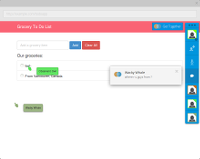
But while Etherpad-style collaboration shows only the text cursor of each connected user, TogetherJS shows the mouse cursor as well—color-coded to match each user, and rendered as a cartoon hand (reminiscent of "Mickey mitts" as they are known to animation fans). Mouse movement is shown in real time—or as close to it as the connection allows. Mouse clicks are also shown, as a flashing circle underneath the clicker's cursor after each mouseup() event. Moreover, TogetherJS tracks changes in the state of most interactive DOM elements: buttons, checkboxes, fields, text areas, and so on. The floating toolbar also holds an "Invite a friend" button that lets the user copy the URL of session and send it to another person over email, instant message, or other means.
The messages that TogetherJS relays through the server are JSON objects. In addition to the cursor-movement and text-entry messages, the utility can relay text messages between users, which amounts to an ad-hoc chat system for the page. The toolbar also allows users to start an audio-only WebRTC media channel for verbal chat, although that feature is technically independent of TogetherJS itself.
What users get out of the vanilla TogetherJS experience is, in a lot of ways, the same as a collaborative editor like Etherpad or Google Docs—except that it can work on any site, and the collaboration feature can synchronize actions taken on any DOM objects in the page, not just the editor's shared document. This makes TogetherJS a powerful tool for viewing and editing a page remotely, but there are some important distinctions between its approach and that of the Etherpad-style collaboration services.
First, TogetherJS only relays messages between two browser windows; no state is changed on the server's copy itself unless the web application is retooled to support custom TogetherJS messages. Second, TogetherJS works only for the current browser session. Persistent changes, such as to a document in a collaborative editor like Etherpad, are outside of the project's scope. Third, the hub server keeps track of pages by URL, so if the web page in question presents a different URL to each visitor, those visitors will not be able to collaborate. Finally, although TogetherJS synchronizes most DOM elements, there are some that it does not, such as the <canvas> element. Proprietary plugin content like Flash movies cannot easily be synchronized, of course, but playback of <audio> and <video> elements can.
In an October 31 blog post, developer Ian Bicking explains the decision to not support document persistence and other "high-end" features as an attempt to make TogetherJS as broadly applicable as possible. Building a more feature-rich tool for specific use cases requires experts in those use cases, he said, but it also limits how the resulting code can be used:
On the other hand, Mozilla did go out of its way to include support for several popular JavaScript utilities, such as the CodeMirror and Ace editing components. Mozilla also provides help within the TogetherJS documentation for instrumenting other web applications for more complex synchronization. All TogetherJS messages are namespaced, so adding custom application-specific message types is not complicated.
It is also not necessary to use Mozilla's public TogetherJS.com site as the hub server. The code for the server (as well as for the client-side JavaScript) is published on GitHub under the MPL 2.0.
The main TogetherJS site showcases three example sites: a to-do list, a simple drawing application, and a Mad Libs game. There are more substantive ways to field test the tool as well, including the JSFiddle online code editor, Mozilla's Thimble web page editor, and a pair of plugins for WordPress.
Much as Bicking described, the simplicity of TogetherJS may be its best feature. There are, after all, a plethora of collaborative code editors available on the web today. Few of them distinguish themselves with features that the others do not share; adding one more to the list would not be a compelling move for Mozilla. But TogetherJS might make it possible for all sorts of other sites to make use of real-time collaboration—anyone who has attempted to review a site design, for example, knows how frustrating it can be to try explaining a design problem via email (and how time-consuming it can be to assemble a collection of screenshots).
Beyond merely working on sites themselves, however, the TogetherJS team has visions of its code enabling new social interactions with web pages at their center; Bicking described it as "cobrowsing" in another post. Regardless of whether that term works its way into the lexicon, though, one thing seems clear: TogetherJS offers a lot of possibility simply by being an ad-hoc service. No user accounts are necessary, and no coordination is required between participants other than sharing a URL. That low barrier of entry is good news for users as well as site owners.
Page editor: Jonathan Corbet
Inside this week's LWN.net Weekly Edition
- Security: Let's talk about perfect forward secrecy; New vulnerabilities in kernel, libav, phpmyadmin, strongswan, ...
- Kernel: Atomic I/O operations; USB-stick stalls; Ktap; The future of realtime Linux.
- Distributions: Which init system for Debian?; OpenBSD, GNU Linux-libre, ...
- Development: Systemd and nspawn; Valgrind 3.9.0; DRI3 for X.org; introducing new ideas to free software communities; ...
- Announcements: Linaro Connect videos, Rockstar sues Google, ...