

Distributions
Ubuntu Touch 1.0
Along with desktop and server editions, the release of Ubuntu 13.10 on October 17 brought the "1.0" version of Ubuntu Touch for the Galaxy Nexus and Nexus 4 smartphones. Many improvements have been made since LWN.net last took a look at Ubuntu Touch this past February. Having used Touch on the Nexus 4 as my regular, everyday phone since the release date, this reviewer is surprised by the system's usability, while disappointed by several gaping holes of missing functionality and other noticeable rough edges. Please note that this review is of the image released on the Ubuntu 13.10 release date of October 17; while unstable images for the 14.04 development cycle are already available for download, this review does not cover them.
Flashing the image is ostensibly no more convoluted than installing a custom Android ROM on a Nexus device. Unfortunately, following the instructions on the Ubuntu website gave me a non-functioning device. Had I scrolled down past the installation steps on that web page, I would have found advice to wipe the /data partition and retry if there are installation problems. Once I finished doing that and added an option to the installation instructions specifying the Nexus 4 as the device to be flashed, I had a working Ubuntu Touch smartphone.
While Canonical does state that Ubuntu Touch is for "developers and industry partners only", and the page with flashing instructions begins with a disclaimer, Mark Shuttleworth claims that Ubuntu Touch has reached "1.0" status. This is accurate, as long as "1.0" here refers to the feature completeness of the core Ubuntu Touch system. Several rough edges do remain.
On first boot, a helpful tutorial explains how to navigate Ubuntu Touch's interface: swiping the left edge reveals the Unity launcher bar, swiping from the right edge brings up the last used application, and swiping from the notification bar reveals system information, depending on which icon the user swipes from. There are no soft keys, which I took great delight in; I've always thought that Android soft keys were a waste of precious screen real estate, and Ubuntu Touch takes full advantage of the Nexus 4's screen.
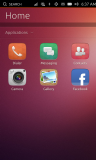 The home button at the bottom of the launcher bar brings up the Dash's
home screen. On this screen, one will find a number of basic applications
(including a dialer and messaging) as well as dedicated web apps (including
Facebook and Gmail). The Dash also includes an Applications page, with a
list of locally-installed applications and suggestions for third-party
applications for download; a Videos page, featuring links to online and
installed videos; and Music, featuring links to suggested music for
purchase and download as well as installed music.
The Dash interface will be familiar to Unity users, particular to those of Ubuntu Desktop 13.10. The built-in search function by default brings up local and online searches, analogous to the Smart Scopes tool of the 13.10 desktop. This can be disabled.
Overall usability and reliability has improved greatly since February. Gone are the placeholder applications, replaced with enough working applications for the device to be used as an everyday phone. Making and receiving phone calls, SMS, the music player, taking pictures from the front and back cameras, and the WebKit-based browser all work. Video files, at least .mp4 video files, play smoothly. The Weather app is well-designed. Shorts, an RSS reader, is clean; adding new feeds is easy. USB connections to an Ubuntu laptop work, allowing the device's filesystem to be mounted; this allows music and other files to be easily imported to the phone. With Google Maps mobile providing basic directions through the browser (although location detection does not work) and the included Dropping Letters word game being surprisingly compelling, an Ubuntu Touch user can successfully navigate with the device and then keep themselves entertained upon arrival.
On a more technical side, the Mir display server now powers the system; Android's SurfaceFlinger display server is nowhere to be found. That is a remarkable achievement, given that Mir was announced less than a year ago. Linux power users will be delighted to find a Bash shell pre-installed. Not based on BusyBox, this is a full shell that taps into the system's GNU utilities. Yes, grep and GNU nano (the latter's usefulness marred by the absence of a Control button on the keyboard) are available in Ubuntu Touch.
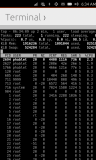 The top utility also works, giving a view of what's running on the
device. Among other things, it shows that applications, once started, stay
around until they are explicitly closed. While Android kills
processes when available RAM gets tight, Ubuntu Touch appears to do no such
thing; only closing apps manually brings back relatively smooth
performance. This may help explain the sluggishness users encounter when
multiple apps are running in the background.
Sluggishness is not the only usability issue here. There is no lockscreen capability to speak of, not even four-digit PIN protection. The notification bar contains multiple drop-down shades, with each shade linked to a particular small icon that must be selected; reaching the right shade the first time can be difficult. Brightness and Bluetooth settings are not retained between screen-blanking-and-resuming, and time zone settings are not remembered between shutdown and startup. The latter is particularly irritating, as I found the time always set four hours late on boot, requiring manual correction after every boot.
A cellular signal strength indicator is a welcome addition to the notification bar, as is an icon for a functioning 3G mobile data connection, which was missed in the February build. Unfortunately, a dropped 3G data connection cannot be reestablished in the same session. A reboot is needed to reconnect, which reacquaints the user with the aforementioned time-zone-setting irritant.
Extending the system's usefulness by downloading a selection of open source third-party apps is a welcome addition to Ubuntu Touch. After setting up an Ubuntu One account on the device, new apps are easy to find and easy to download ... the first time. Unfortunately, quality assurance seems to have been missing on this front. Some of the apps work fine; uTorch does light up the back camera's LED as expected, and the X-Type app, which is a glorified bookmark to an HTML5 top-down shooter web game, provides some entertainment. But some of the apps simply do not work. Two drawing applications would launch but not accept drawing input, and the Saucy Bacon recipe application would not launch. Worst of all, after rebooting the system, I was unable to download any more apps. I kept receiving error messages regarding my Ubuntu One credentials, but nothing I tried (deleting and reentering my account information, starting another new Ubuntu One account and integrating it) worked. There appears to be no means to sideload Touch apps from an Ubuntu desktop either, so I was completely out of luck. That was very annoying, as I really wanted to play Snake.
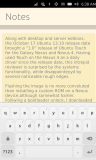 Much of the first draft of this review was written on Touch's
built-in Notes app. The state of Notes provides an excellent summary of
what is excellent and
what is disappointing about Ubuntu Touch. As with the
other built-in applications, Notes keeps the system's theme of simplicity,
cleanliness, and elegance. As with most other apps, a simple swipe up from
the bottom edge reveals Note's menu. Tapping "Add" brings up a new yellow
blank note and a keyboard. Sadly, neither auto-complete nor spelling
corrections worked with the portrait keyboard. Tilting the device to
landscape changed the device's orientation, including the keyboard's, but
most of the keyboard in landscape mode would not accept input; only the portrait
keyboard can be used with the device.
The Notes app experience reflects the rest of the system quite well. Enough functionality is available for Linux power users to accept using Ubuntu Touch to drive their personal smartphone. But major bugs and gaps in the system are plentiful. This jars somewhat with Canonical's claims that the October 17 image is a "1.0" release.
Ubuntu Touch is a "1.0" to the extent that the UI works relatively smoothly, the pre-installed apps all work roughly as expected, and mobile data connections can be made. That is, it works as a basic smartphone. Everything else is hit-or-miss.
Ubuntu Touch continues to evolve rapidly. When I reflash for the 14.04 release, I anticipate that most if not all of my above criticisms will be addressed. I also look forward to news of the development of the expected desktop convergence capability. Ubuntu Touch shows a lot of promise, and I eagerly await future developments in this space.
Brief items
Distribution quote of the week
Fedora to switch to Python 3 by default
The Fedora Engineering Steering Committee has approved a proposal to switch to Python 3 as the default version of Python for the Fedora 22 release. Among other things, this change implies switching from yum to DNF as the Fedora package manager.Musix GNU+Linux 3.0 RC1 released
It's been four years since the Musix project had a stable release. Now with Musix GNU+Linux 3.0 RC1 they are close to another stable release. "We updated more than 300 programs from Debian Wheezy, re-installed kde-full, Rakarrack, Jamin, Blender and various other programs for artistic creation. MusixControl works only in terminal, but that will be resolved soon. Icewm desktop, KDE and Lxde are tailored to activities (office, audio, MIDI, graphics, etc.) The Kernel 3.4.14-gnu-RT23 is 100% free as well as all software in Musix and operates in real time for audio and music apps."
Distribution News
Fedora
Fedora working group announcements
The Fedora Project's plan to create a set of working groups to chart its path forward was covered here recently. Now most of those groups have named their members; announcements have been posted for the workstation, server, cloud, and base design groups. The workstation group has also posted a draft governance charter for review.
Red Hat Enterprise Linux
Red Hat Enterprise Linux 3 Extended Lifecycle Support 3-month Notice
RHEL 3 ELS will reach its end-of-life in three months. "We encourage customers to plan their migration from Red Hat Enterprise Linux 3 to a more recent version of Red Hat Enterprise Linux 5 or 6. As a benefit of the Red Hat subscription model, customers can use their active subscriptions to entitle any system on a currently supported Red Hat Enterprise Linux 5 release or Red Hat Enterprise Linux 6 release."
Newsletters and articles of interest
Distribution newsletters
- Last Week in CyanogenMod (October 26)
- Debian Project News (October 28)
- DistroWatch Weekly, Issue 531 (October 28)
- Ubuntu Weekly Newsletter, Issue 340 (October 27)
Page editor: Rebecca Sobol
Next page:
Development>>