

Miro 6, video, and the web
The Participatory Culture Foundation (PCF) released version 6.0 of its GPL-licensed desktop video application Miro in April. There are performance improvements and important new functionality, as one might expect. But Miro's development over the years also serves as a barometer for the state of online multimedia content—and the trend these days seems to be pulling away from RSS and other open standards.
For the benefit of the unfamiliar, Miro is a cross-platform GUI application designed to consolidate online audio and video sources into a single player that automatically handles subscriptions and other sources of recurring content. In the early days, it was named Democracy Player, and the emphasis was on managing RSS and Atom feeds for video sources, akin to a podcasting client for video. PCF's larger mission centers around promoting decentralized media creation and distribution; its other projects include Miro Community, a web platform for building video-sharing sites, the Amara framework for user-contributed video subtitles, and Miro Video Converter, a video conversion application (whose functionality is also available in Miro itself).
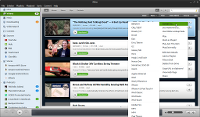
Over the years, support for additional means of content delivery have been added to Miro, including Bittorrent, web-based video sites (i.e., those that embed video content but do not produce a parsable feed), and dedicated services like Hulu. The application's interface resembles a desktop music player: content sources are listed in sidebar, with a collapsible tree grouping sources by type. Feed subscriptions are listed under "Podcasts," and Miro indicates the availability of new material with a numeric indicator next to the feed title. Each feed has separate settings regarding whether new items are automatically downloaded, how long they are retained, and so on.
Links to web video sites and digital music stores are each grouped in their own category, but Miro does not check either of these service types for new content automatically. The application can also manage a local music collection much like any other audio player. Oddly enough, although the music management feature allows users to browse by album and artist, the video management feature does not sport similar library-like options for managing a collection of local video files. Instead, it presents a sorted list and highlights entries that have not yet been watched—the emphasis is on watching what is new and moving on.
Feed me, see more
Miro is written primarily in Python, and the Linux version uses GStreamer for media playback and FFmpeg for format conversion. Although the earliest versions of the application focused on video feed management, an embedded browser engine has been available in Miro since the 1.0 release, allowing users to search for and bookmark video sites that do not produce a proper feed. Initially the engine was Gecko on all platforms, but starting with the 3.0 series in 2010, Miro has used WebKit on Linux.
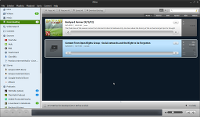
By far the most noteworthy change in the 6.0 release is that it finally restores working Flash support on Linux (which had been broken since 2009), without which many of the web-based video services were unusable. However, Flash support is not an all-or-nothing proposition, and its value to the user depends on a number of variables.
The Linux version of 6.0 comes with a handful of well-known web video services (YouTube, Hulu, and PBS) pre-listed in the application's sidebar. Users can add their own by entering the URL, and the sidebar entries are essentially just browser bookmarks—nothing prevents one from loading up the sidebar with non-video sites (music services like Spotify, popular destinations like LWN.net, etc.). Flash videos do indeed play, although playback is dependent on having a Flash plugin by default. The official plugin, of course, is a proprietary binary blob, which not every Linux user will be thrilled with. The grim reality, however, is that avoiding the proprietary Flash plugin remains a process fraught with difficulty.
There are alternatives, albeit imperfect ones. If one visits the YouTube HTML5 trial page, for instance, one can switch on delivery of the HTML5 <video> element instead, and enjoy YouTube content in WebM or H.264 format instead. Getting to the trial page within Miro is not simple, unfortunately: one can only navigate to the URL directly by adding it as a sidebar entry (and the only other option is logging in to a registered YouTube account and changing the account settings). At present, however, YouTube remains one of the few video services that offers an HTML5 option. Ironically, it is also one of the only video sites supported by the other option: the open source Flash plugins Gnash and Lightspark.
In practice, visiting most Flash-driven video sites in Miro is little different than visiting them in Firefox or another browser. Since fewer and fewer services seem interested in distributing video over RSS or Atom, preferring instead to draw the user into their own little captive portals, offering a better-than-browser experience is a challenge that Miro will have to rise to meet. The application does do its best to parse content that does not come in standard feed form—for example, one can add a YouTube "channel" or search results page to the Podcasts sidebar, and Miro will attempt to pick out its video content and download it, but the results are unreliable. PCF also takes a firm stance against what is perceived as illegal activity: it will not allow the user to download videos embedded in a web page, nor is there any way to add a browser extension which adds such functionality.
Other than the long-awaited Flash fix on Linux, the 6.0 release of Miro is primarily a performance upgrade. Whether or not there are real-world speed gains can be hard to gauge, particularly on Linux where previous releases only handled feed-delivered video (where the speed of one's Internet connection is the biggest factor), but in my testing 6.0 is certainly no slower than it predecessors, and it is much less crash-prone. The side features, such as video conversion and portable device synchronization, have received updates as well, so they support newer phones and media codecs. Miro 6.0 also restores compatibility with the MythTV DVR platform; MythTV includes a tool called MiroBridge that treats Miro downloads as a virtual channel on a MythTV backend. MiroBridge broke on Linux during the Miro 4.x cycle, and PCF only implemented the fix for 6.0, skipping the 5.0 series altogether.
Although Miro does offer a smooth playback experience, it has its drawbacks, starting with the embedded browser. Much as there is no simple way to download a video from a web site in Miro's browser, there is no way to install an ad-blocking extension or tweak other settings. Thus, users for whom annoying web ads are usually a distant memory may be shocked by the sensory assault of giant, animated commercials plastered in every corner. There also appears to be no way to add music download stores that are not built-in by default (perhaps because PCF uses referral codes from store purchases as a means of fundraising).
Miro also grabs the first media file it finds from each podcast episode, which is not always desirable. Sometimes the user might prefer one of the "fallback" options, either due to the format (e.g., Theora instead of H.264) or due to file size (not everything must be seen in HD).
The $64,000 question: who cares?
Taken on its merits alone, Miro is a capable application. The integrated MiroGuide service run by PCF is an excellent way to find watchable and listenable content online amidst all the garbage, and Miro itself greatly simplifies managing and watching video (or audio) podcasts. Its player works well, offering full-screen functionality and a unified interface even for disparate sources. It even boasts simple format conversion and can synchronize portable devices. Watching video and listening to podcasts in Miro is a noticeably better experience than accessing the same material in the browser—just like reading blog content aggregated into a feed reader is noticeably better (for most people) than visiting the same blogs in the browser.
Nevertheless, Miro remains a comparatively little-known application, even among those who passionately mourn the impending demise of Google Reader. Perhaps the amount of content each reader consumes is part of the difference; I have 623 blog subscriptions at the moment, which dwarfs by several orders of magnitude the number of video and audio podcasts I have time for. On the other hand, video fanatics have plenty of other choices available, from set-top boxes like the Roku to open source media centers like MythTV or XBMC (which typically rely on third-party developers maintaining screen scraper code to extract video from web sites—which periodically break). Miro may simply be stuck in the middle: better than a browser (which gets the casual viewer by default), but less convenient than XBMC (which captures the obsessive viewer).
Miro's biggest obstacle, however, is something entirely beyond its control: the trend of commercial video sites to move away from RSS feed delivery towards self-contained, browser-only video. The trend is not technical in its motivations; businesses are rejecting feed-delivered video for financial reasons. But it still puts Miro in a difficult position. On a technical level, Miro for Linux may soon face yet another obstacle, since Adobe has decided to discontinue the NSAPI version of the Flash plugin for Linux. Perhaps switching to Chromium's embedded browser engine would help, perhaps Gnash and Lightspark will see renewed interest, or perhaps Mozilla's Shumway will make progress. But whatever happens, eventually a major shift will have to be made in order to retain Flash video playback on Linux. We are, of course, told that Flash is dying, but its longevity is legendary enough by now that few are willing to hold their breath and wait.
Miro may occupy a small niche, caught between the existing web
browser experience on one hand and the media center experience on the
other, but a small niche does not make a project unimportant. Miro's
adeptness with video feed management is still unique; in comparison,
the RSS feed support in XBMC and MythTV is awkward and second-class.
The closest parallel is probably to audio podcasting clients like
gPodder. To many users, the
podcasting support in generic desktop audio players like Rhythmbox is
good enough. But it isn't great, and gPodder still attracts
plenty of users who prefer the first-class feed support. Miro's early
release, too, proved that if you can do one thing and do it well,
users will appreciate you. The restoration of Flash video support in
6.0 muddies the water a bit, but it does not detract from Miro's core
strength.